


Installatiehandleiding voor het digitale instrumentenpaneel 5N van de VW Tiguan (2009–2017): 11 concrete stappen, montage en fabrieksfuncties
VW Tiguan 5N installatiegids voor digitaal cluster laat zien wat er toe doet voordat je koopt en voordat je het dashboard sluit: de exacte fysieke installatievolgorde, de fabrieksinformatie die op de gematchte route blijft, CarPlay / Android Auto kaartweergave en iKAGOO’s montagecontrole vóór verzending.
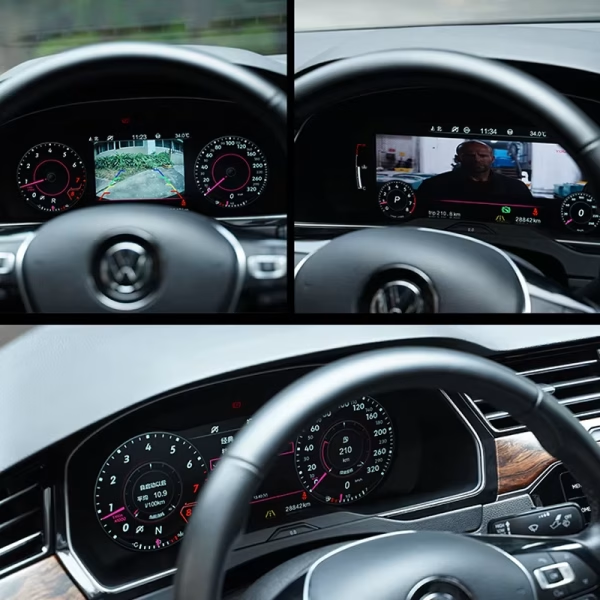
Wat verandert er na de upgrade van het digitale instrumentencluster van de Tiguan 5N?
De belangrijkste waarde is een schoner zicht voor de bestuurder zonder de voertuiginformatie waar u nog op vertrouwt op te geven. De gematchte route combineert een modern 12.3-inch cockpit met ondersteunde fabrieksgegevens en telefoon/kaartweergave dichter bij de bestuurder. Als u deze route met andere VW-applicaties vergelijkt, blader dan door de Volkswagen digitale instrumentenclusterreeks per model in plaats van aan te nemen dat één cluster in elk dashboard past.
Snelheid, toerental, brandstof, versnelling, kilometerstand, temperatuur en ondersteunde waarschuwingen blijven in het bestuurdersdisplay.
De ondersteunde bediening via het multifunctionele stuurwiel blijft vertrouwd na correcte matching.
Navigatie- of telefoonprojectie-informatie kan verschijnen via de ondersteunde controller of sync-route.
De speciale behuizing houdt het cluster in de oorspronkelijke instrumentpositie in plaats van er een tablet bovenop te plaatsen.
Het verschil zit niet alleen in het scherm. Het gaat erom hoe de juiste versie uw auto bereikt.
Voertuigspecifieke elektronica kan er online identiek uitzien terwijl er verschillende clusterlichamen, connectoren of routes voor behouden componenten worden gebruikt. iKAGOO houdt het afrekenen eenvoudig, voegt vervolgens een extra voertuigspecifieke controle toe vóór verzending en blijft ondersteuning bieden na levering. De iKAGOO kopersbeschermingsoverzicht legt uit hoe compatibiliteit, levering en after-sales verantwoordelijkheden op elkaar aansluiten.
Vergelijk de opgegeven voertuigroute met uw bouwjaar, originele cluster en dashboard. Vraag alleen om hulp vóór het afrekenen als u dat wilt.
Na het bestellen controleert iKAGOO opnieuw de voertuig/versie-informatie die nodig is om de juiste clusterroute voor te bereiden.
Het gematchte clusterlichaam, accessoires en benodigde route worden vóór het verpakken voorbereid in plaats van eerst een generieke eenheid te sturen.
Als de installateur een afwijking of probleem met ondersteunde functies vindt, kunnen foto's/video worden beoordeeld voordat de bedrading wordt gewijzigd of het product wordt geretourneerd.
Past dit op elke VW Tiguan van 2009–2017?
Nee—het jaar alleen is niet genoeg. De huidige productroute is voor geselecteerde Tiguan Mk1 / Tiguan 1 / Type 5N / 5N Facelift voertuigen. De productlijst omvat geselecteerde 2009–2017 voertuigen; de gedetailleerde werkplaatsbron hieronder is gelabeld 2010–2017. Een latere 2017–2022 MQB Tiguan gebruikt een ander dashboard en installatieroute, dus het mag niet worden gematcht op basis van deze 5N-gids.
Voor de betekenis van fabriekswaarschuwingslampjes of voertuigspecifieke referentie-informatie, gebruik Volkswagen's officiële opzoekfunctie van de eigenaarshandleiding met het VIN van het voertuig.
Installatiehandleiding voor het digitale cluster van de VW Tiguan 5N: bekijk eerst de fysieke route

De 11 afbeeldingen hieronder zijn afkomstig van de geverifieerde Tiguan PQ-werkplaatsbron en zijn gegroepeerd op basis van de echte werkvolgorde: verwijderen, openen, herbouwen en opnieuw installeren. Gebruik voor een ander VW- of Audi-voertuig de installatiehandleiding voor digitale clusters per model in plaats van deze stappen over te brengen naar een ander dashboard.
Volledige installatievolgorde van het VW Tiguan 5N digitale cluster
Plaats het originele cluster op een beschermde werkbank
Bereid het gereedschap voor, maak de onderste bevestigingen los en open de behuizing pas nadat het cluster uit het voertuig is verwijderd.
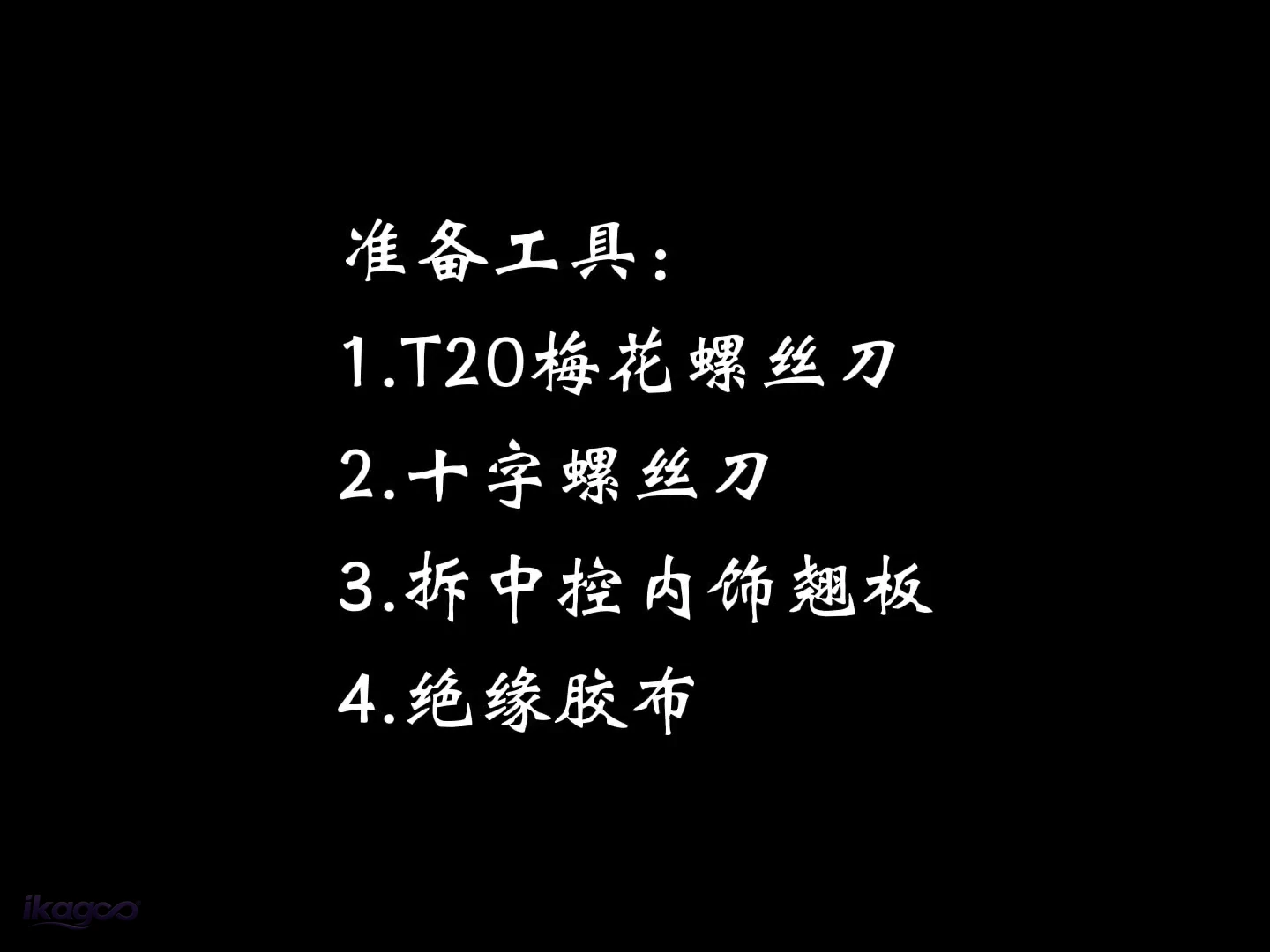 STAP 01
Bereid de vier gereedschappen voor
T20 Torx-schroevendraaier, kruiskopschroevendraaier, interieurtrim-wrikijzer en elektrische isolatietape.
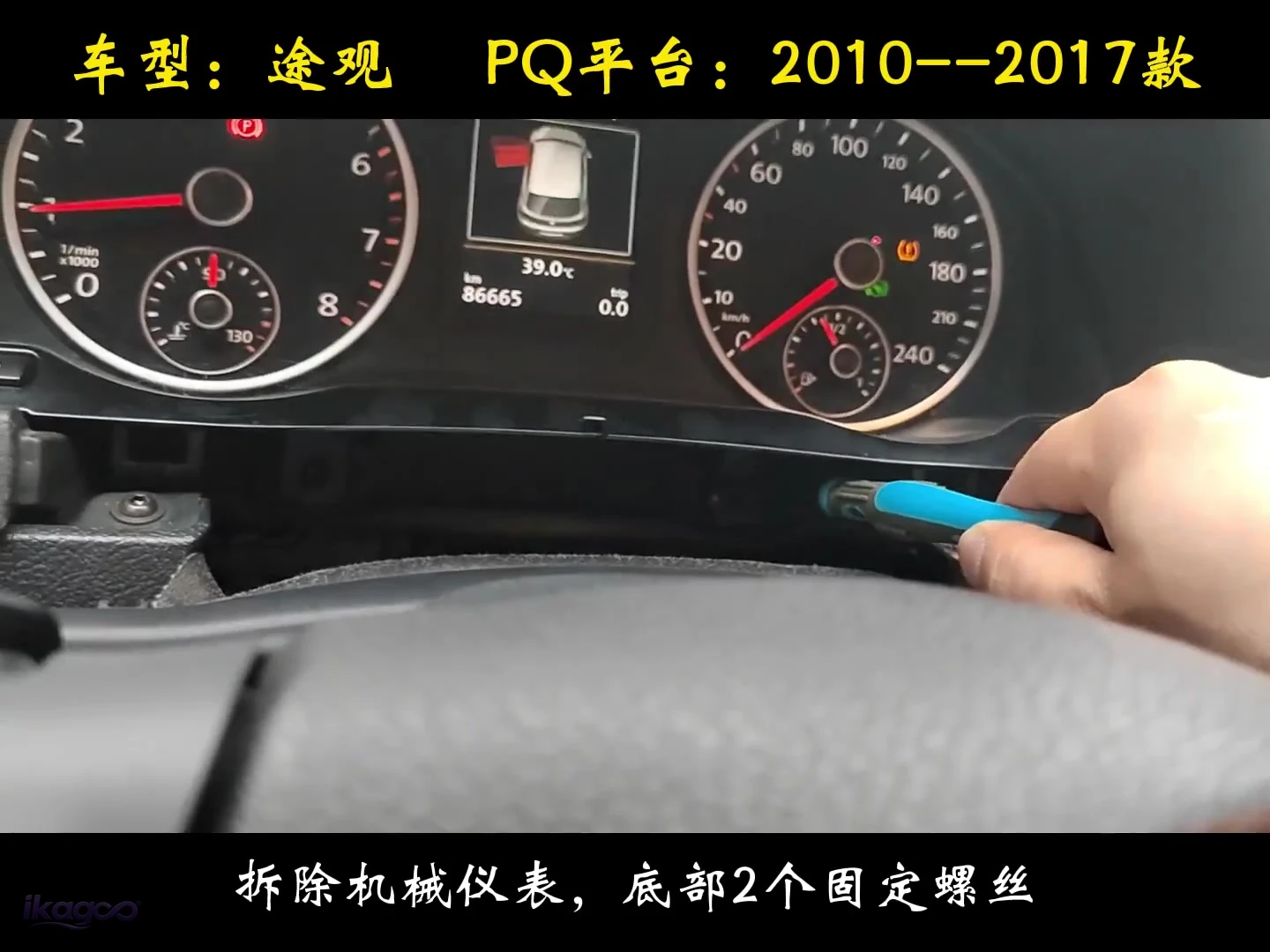 STAP 02
Verwijder de twee onderste schroeven van de instrumentencluster.
Maak de twee onderste bevestigingspunten los en trek de originele instrumentencluster voorzichtig uit het dashboard.
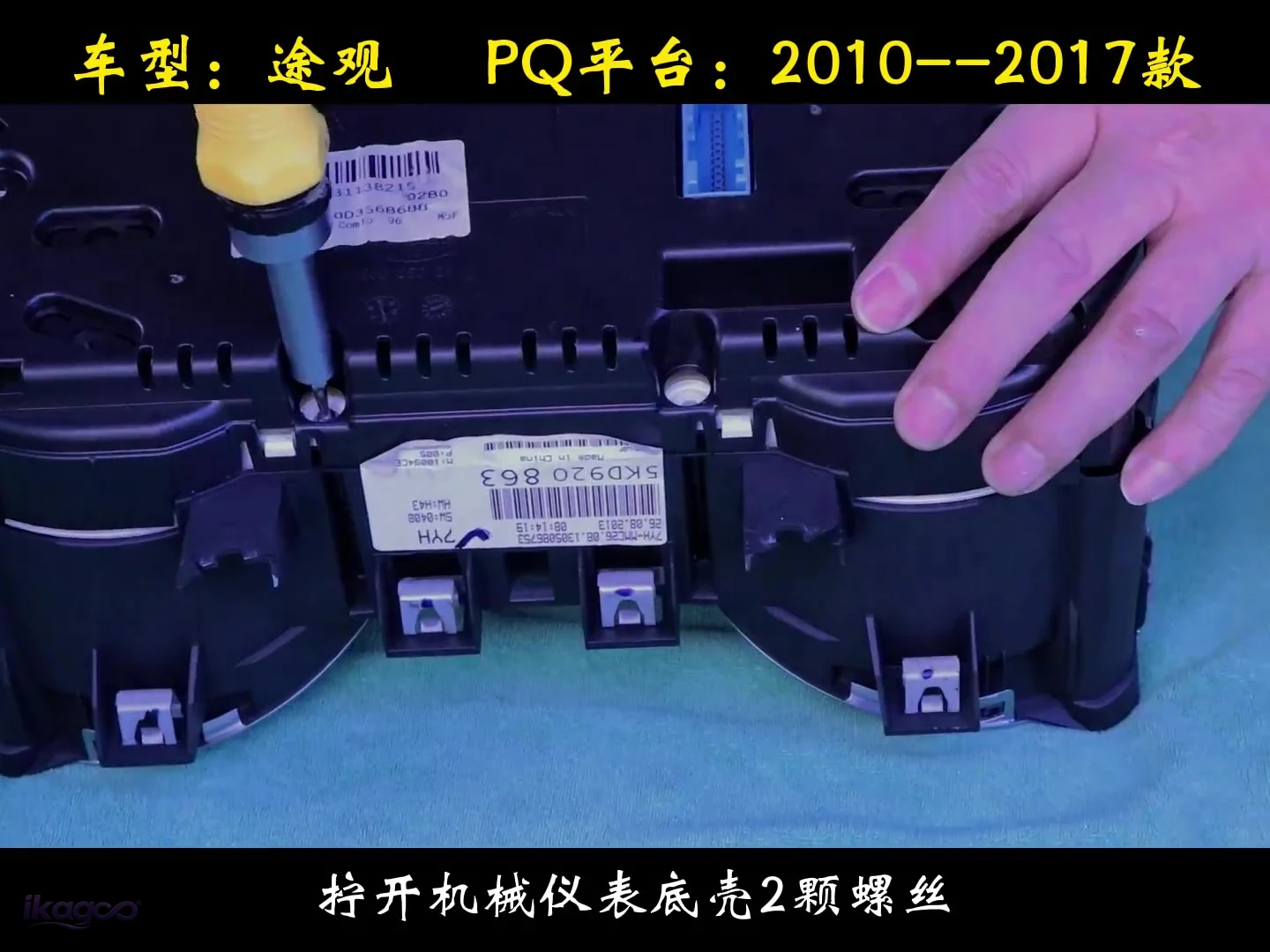 STAP 03
Verwijder de twee behuizingsschroeven.
Plaats het verwijderde cluster op een beschermde werkbank en draai de twee behuizingsschroeven los voordat u de assemblage opent.
Scheid de fabrieksclusterstructuur voorzichtig.
Dit is het meest delicate onderdeel van de installatie en de belangrijkste reden dat de klus als L3 wordt beoordeeld in plaats van een eenvoudige schermvervanging.
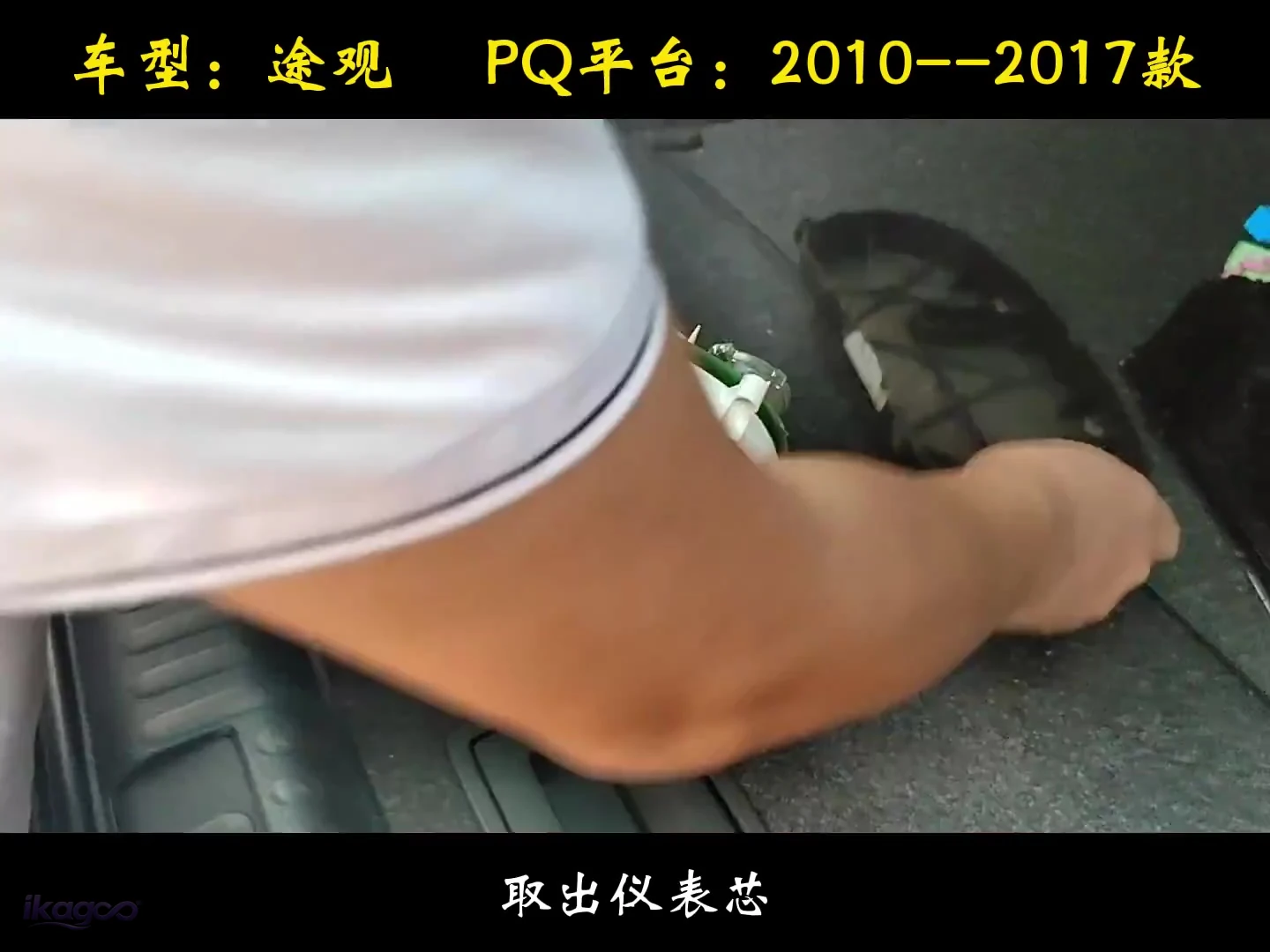 STAP 04
Til de originele instrumentkern eruit.
Verwijder de originele kern zodat de wijzerplaat- en printplaatstructuur netjes op de werkbank kan worden behandeld.
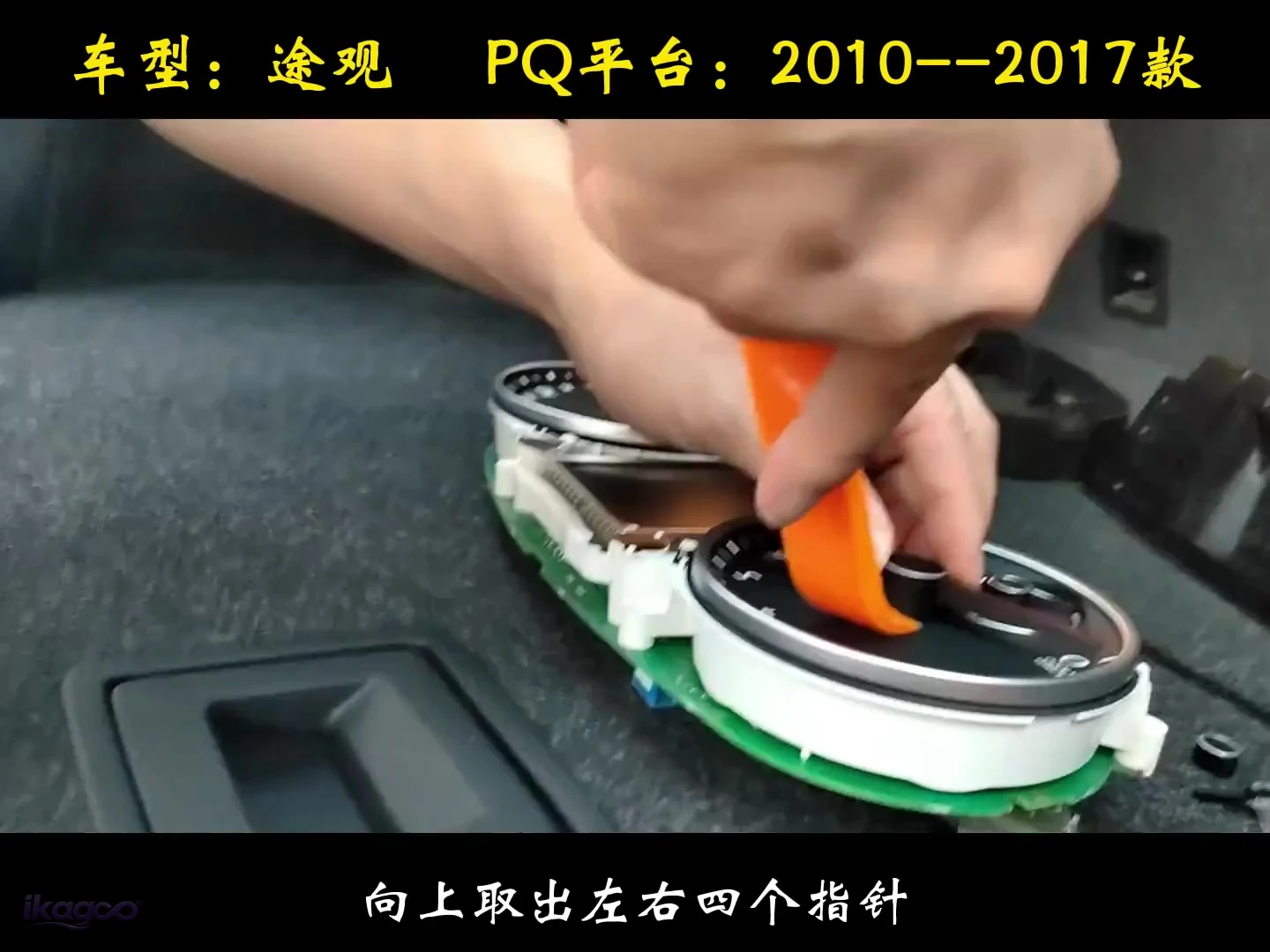 STAP 05
Trek de vier wijzers omhoog
Verwijder alle vier instrumentwijzers verticaal voordat u de decoratieve wijzerplaat verwijdert.
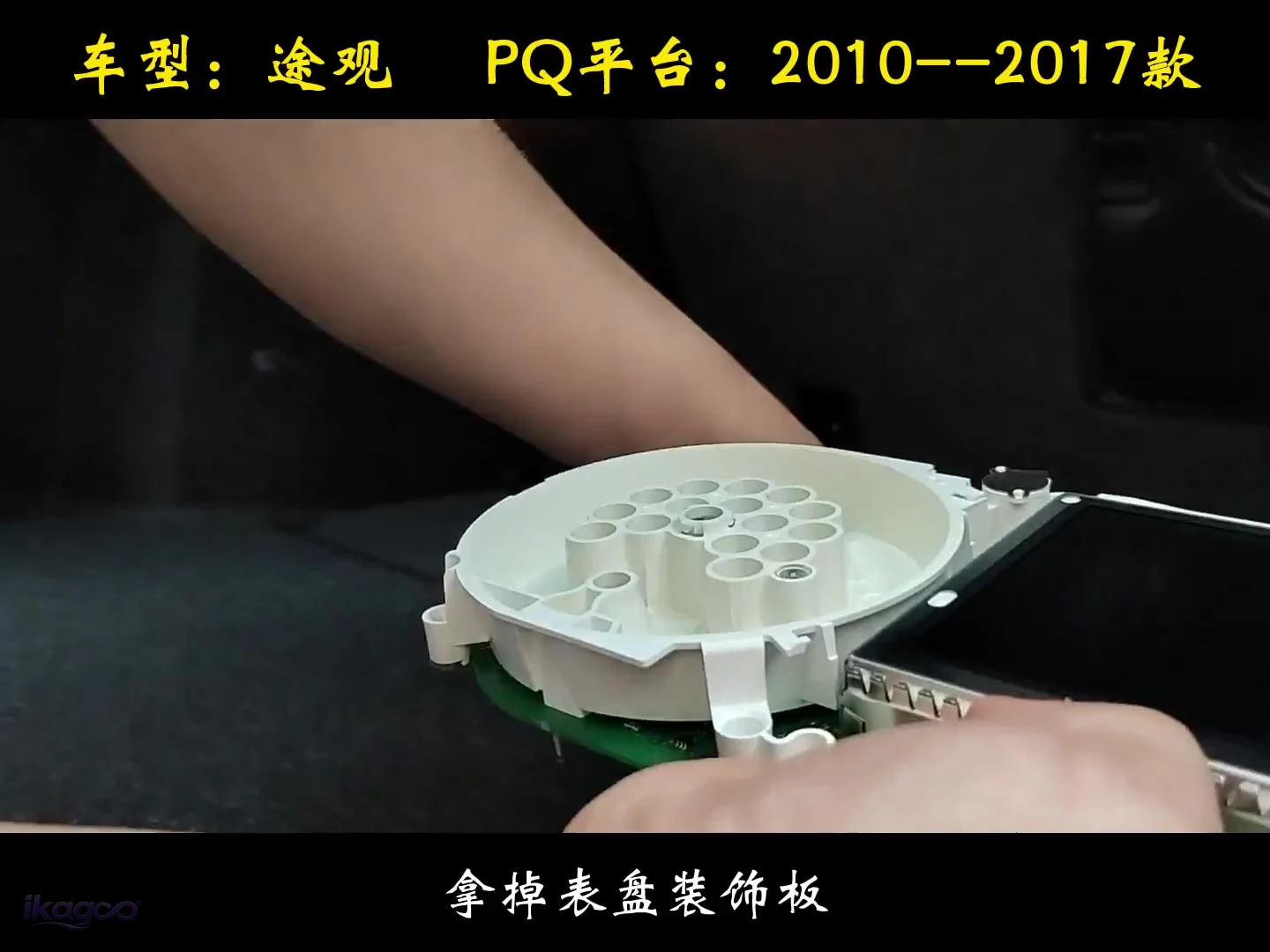 STAP 06
Verwijder de decoratieve wijzerplaat
Verwijder de originele frontplaat om de printplaat en de bevestigingsstructuur eronder bloot te leggen.
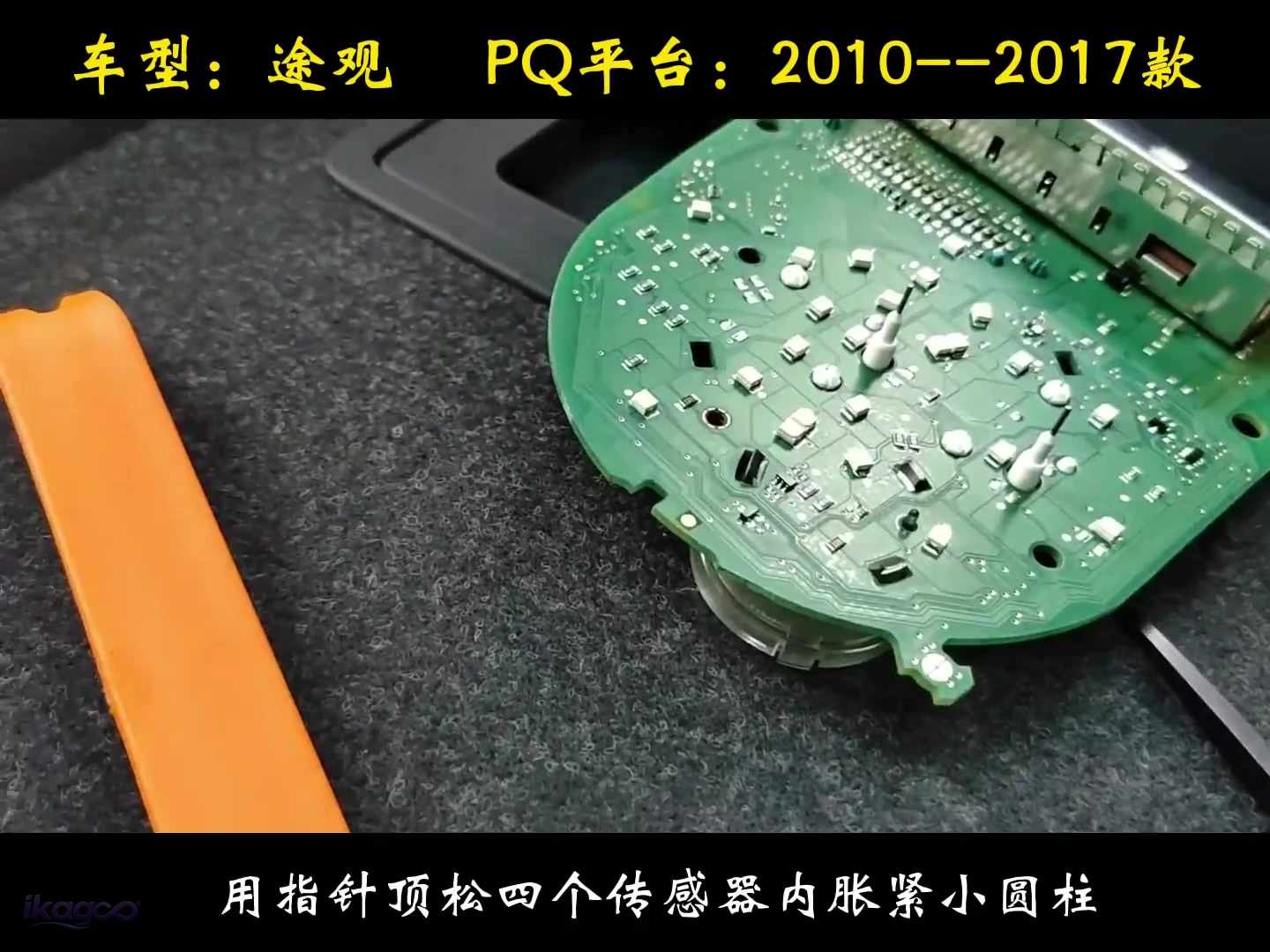 STAP 07
Maak de vier kleine borgpunten los.
De geverifieerde bron toont vier kleine perspassende borgpunten die in het sensorgebied worden losgemaakt.
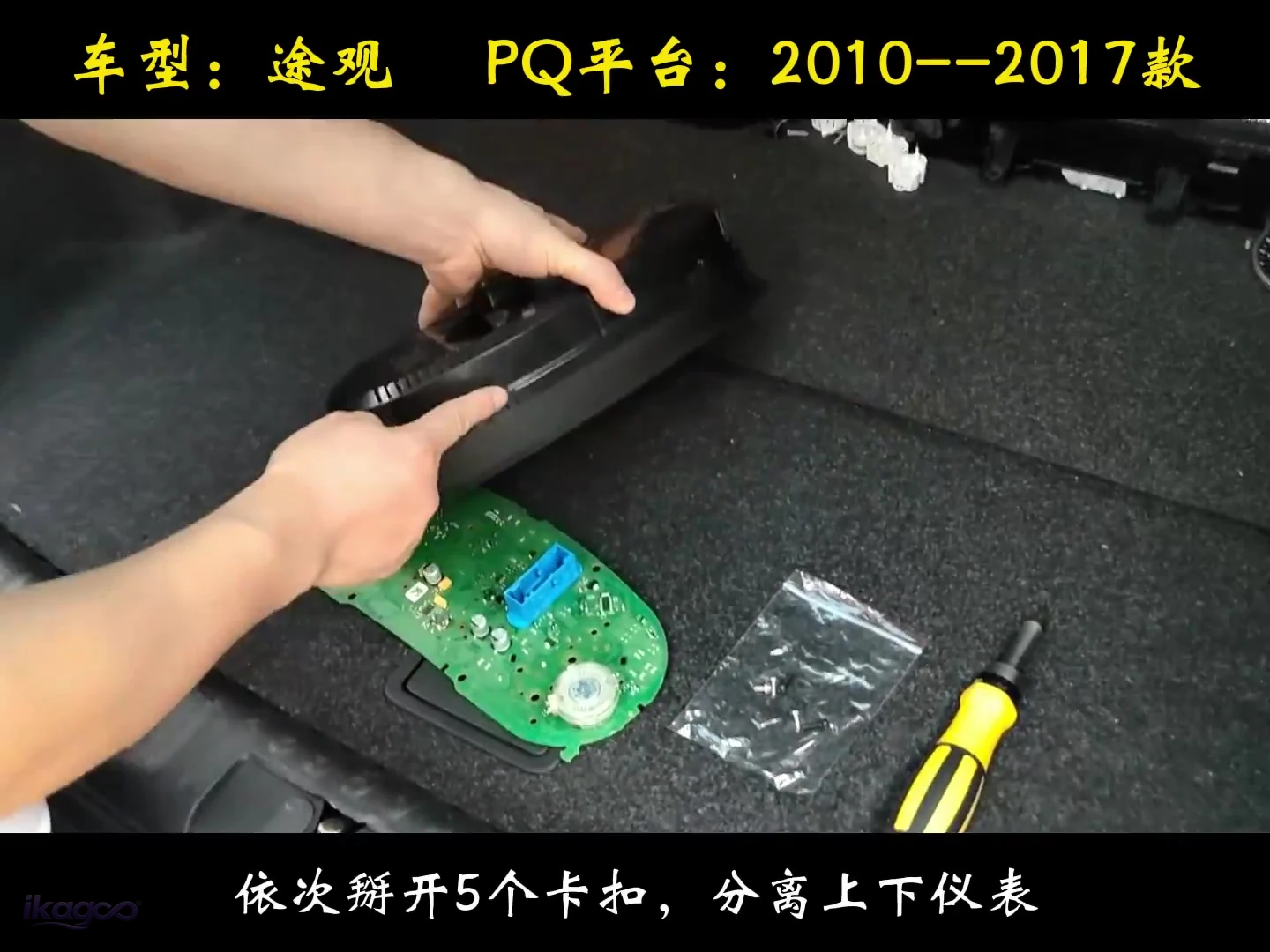 STAP 08
Maak vijf clips één voor één los.
Open alle vijf clips achtereenvolgens en scheid daarna de bovenste en onderste clustersecties.
Zet de interne route vast en sluit de behuizing
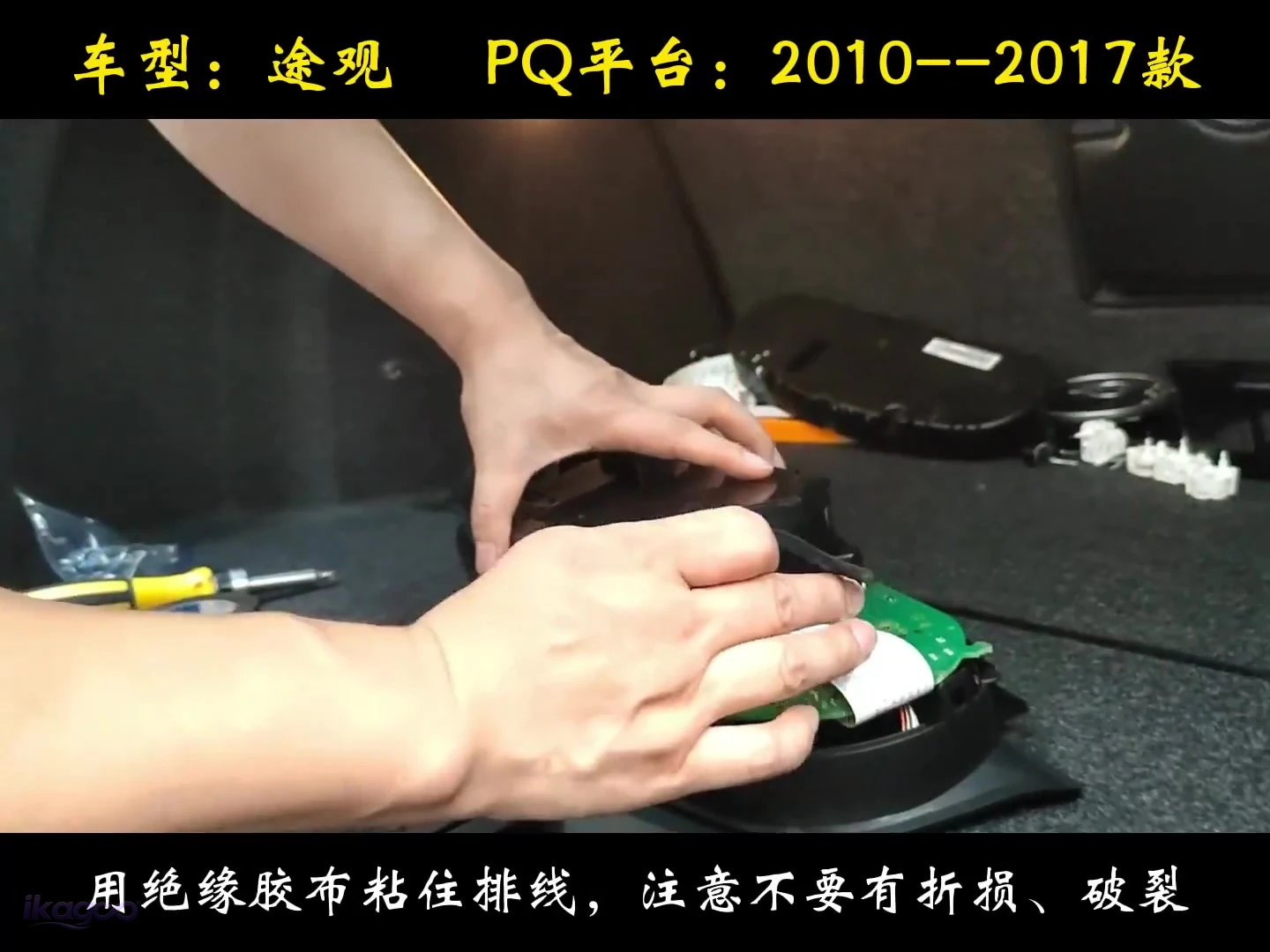 STAP 09
Zet de interne bedrading vast
Gebruik isolatietape om de route op zijn plaats te houden zonder de draad te vouwen, te knellen of te beschadigen.
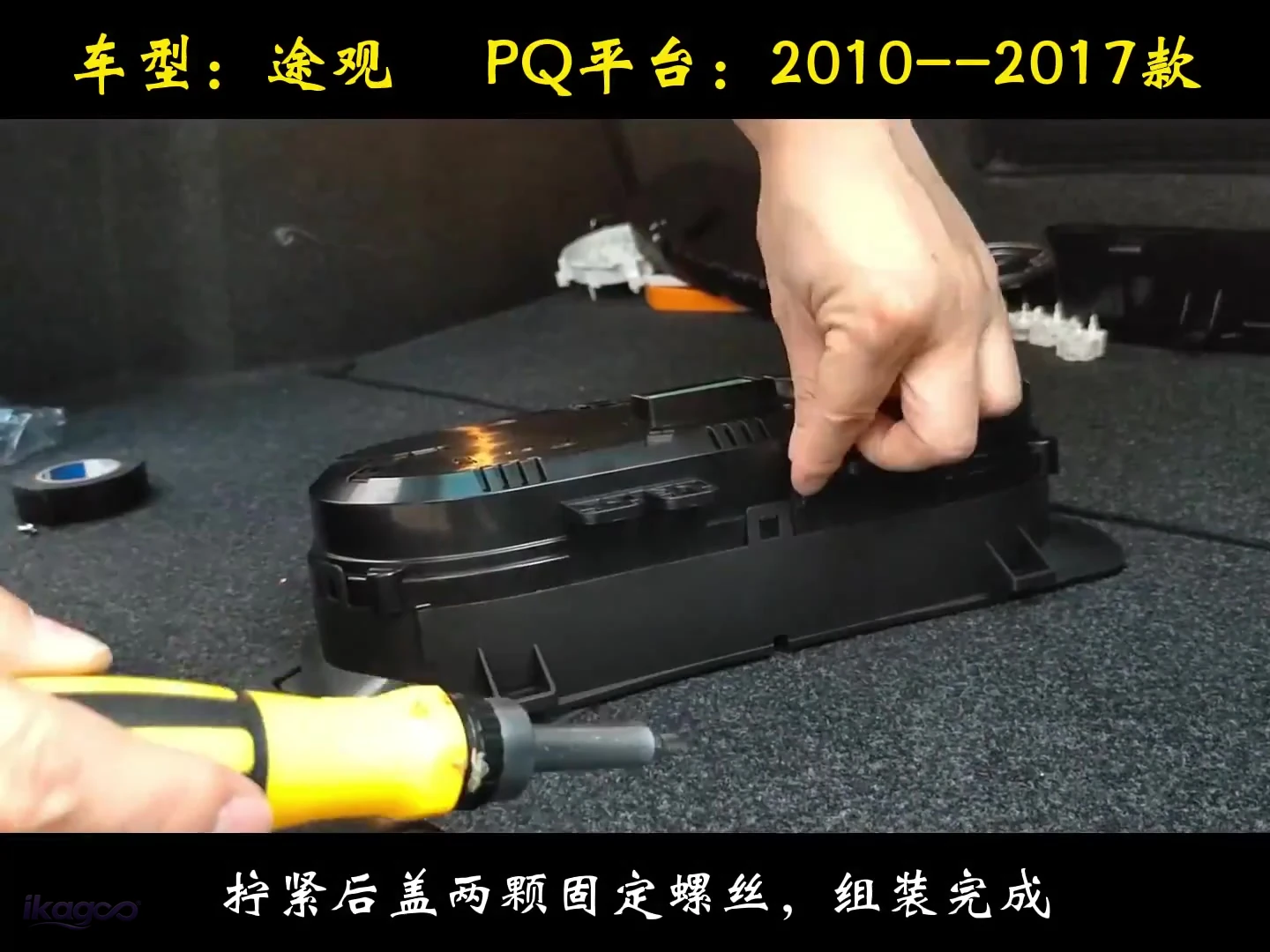 STAP 10
Sluit het achterdeksel
Zodra de interne route is vastgezet, sluit de behuizing en draai de twee schroeven van het achterdeksel vast.
Plaats het cluster terug in het dashboard en test voordat u definitief sluit
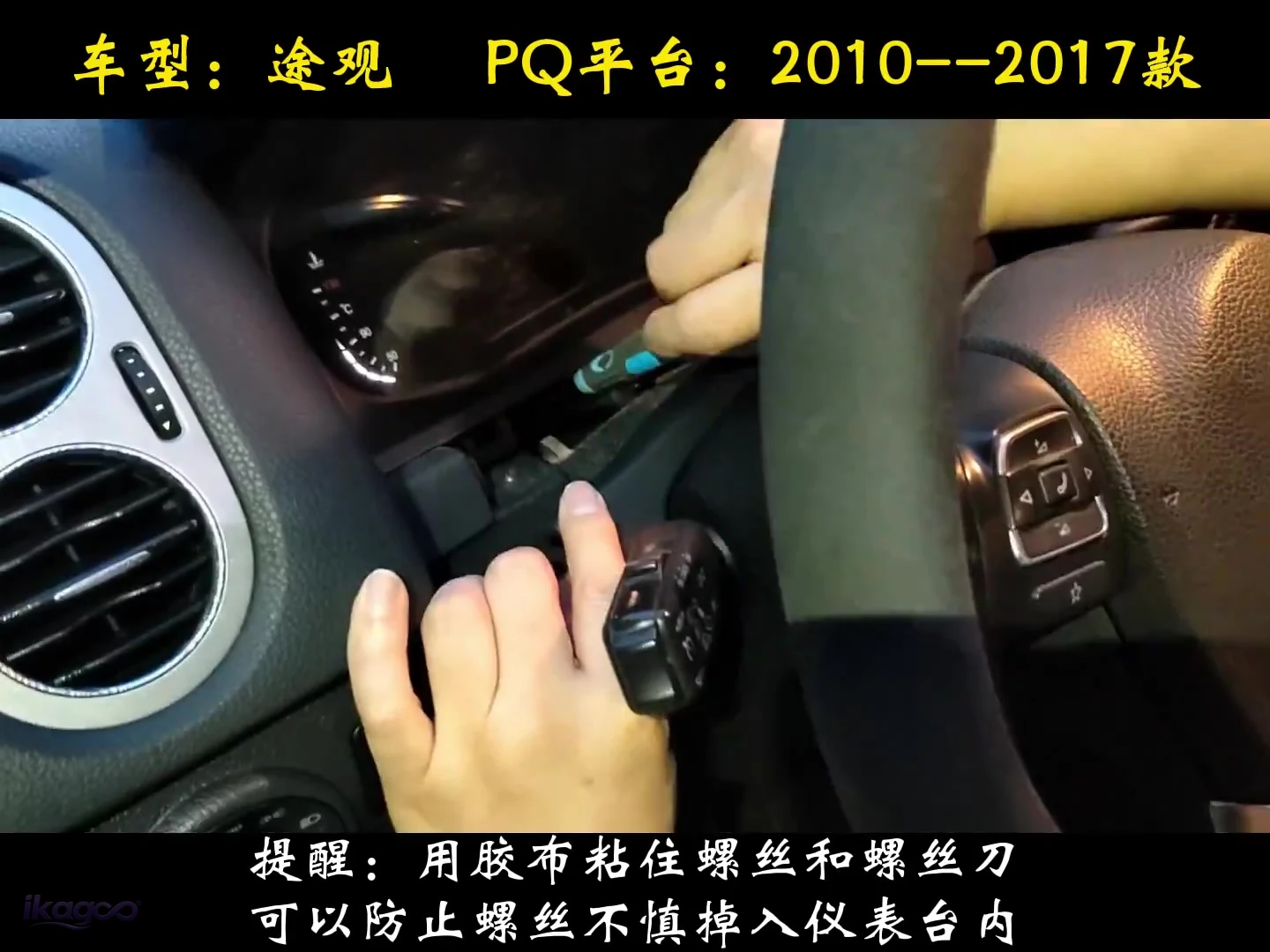 STAP 11
Plak de bevestigingsschroef op de schroevendraaier
Gebruik een klein stukje tape om de schroef op de schroevendraaier te houden, zodat deze tijdens het opnieuw installeren niet in het dashboard valt.
Stop voordat er schade ontstaat als een van deze omstandigheden zich voordoet
Niet snijden, opnieuw pinnen of forceren. Fotografeer het cluster, de connector en het dashboard en gebruik het orderondersteuningspad.
Sluit de behuizing niet over een bekneld lint, draad of bord.
Leg het display en het connectorgebied vast voordat u bedrading of instellingen wijzigt, zodat iKAGOO het bewijs kan beoordelen.
Wat moet werken voordat u het dashboard volledig weer in elkaar zet?
Een succesvolle installatie is meer dan een LCD die aangaat. Controleer de bestuurdersinformatie en de meegeleverde displayroute voordat de definitieve sierlijst teruggaat. Als iKAGOO u later vraagt een ondersteund apparaat bij te werken, volg dan de VW/Audi digitaal cluster online en USB-updatehandleiding in plaats van een niet-geverifieerd bestand te laden.
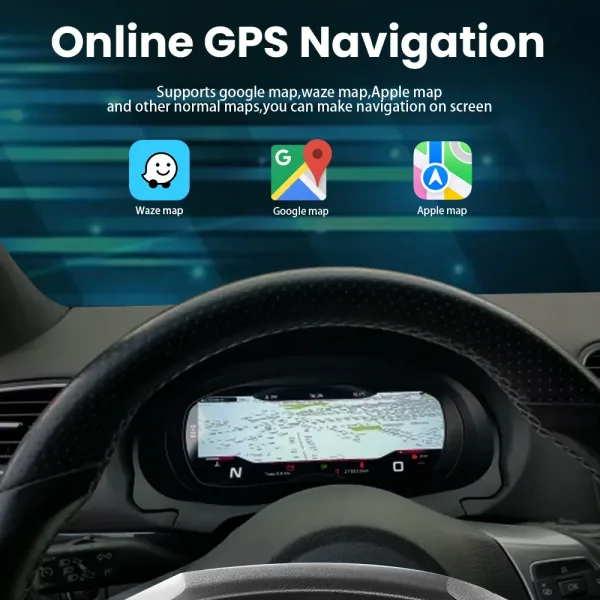

De functiereferentie hoort na de installatie, omdat deze helpt bij het verifiëren van het uiteindelijke displaygedrag, niet bij de demontagestappen.
Is het digitale cluster van de Tiguan 5N de upgrade waard?
Noodzaak van een iKAGOO-upgrade
Hoeveel echte cockpitwaarde voegt deze upgrade toe in vergelijking met het behouden van het originele analoge cluster?
Bekijk de scoringsstandaard →Een 12.3-inch 1920×720 IPS-display vervangt de analoge weergave en behoudt ondersteunde informatie over snelheid, toerental, brandstof, versnelling, kilometerstand, temperatuur en waarschuwingen op de normale kijkpositie van de bestuurder.
Het originele cluster levert al essentiële rij-informatie. Deze upgrade verbetert de zichtbaarheid, interface en cockpituitstraling; het creëert geen basisbehoefte om het voertuig te bedienen.
Eigenaren die een duidelijk modernere cockpit willen, voertuiggegevens in een volledige schermindeling en ondersteunde telefoon-/kaartinformatie dichter bij de bestuurder.
Eigenaren die tevreden zijn met het originele analoge display of kopers wier enige doel de goedkoopste manier is om basisinformatie over snelheid en waarschuwingen te behouden.
iKAGOO Original: compatibiliteit met voertuigen
Hoe betrouwbaar kan het cluster het juiste Tiguan 5N-voertuig matchen en de ondersteunde originele informatiestroom behouden?
Zie de compatibiliteitsstandaard →De route is voor geselecteerde Tiguan Mk1 / Type 5N / 5N Facelift-voertuigen. Correct gematchte installaties ondersteunen de vermelde voertuiggegevens, waarschuwingsinformatie en stuurwielbediening.
Alleen het bouwjaar kan de juiste route niet identificeren. De originele clusterbehuizing, dashboardvorm, LHD/RHD, connector/configuratie en eventuele eerdere modificatie moeten nog steeds overeenkomen; de geverifieerde werkplaatsbron begint bij 2010.
Een geselecteerde 2009–2017 Type 5N met de ondersteunde originele cluster-/dashboardstructuur. Een 2017–2022 MQB Tiguan volgt een andere route en mag niet volgens deze gids worden gematcht.
U kunt direct bestellen en daarna het modeljaar, foto's van het originele cluster/dashboard, de stuurpositie en de modificatiegeschiedenis verstrekken, zodat de route vóór verzending opnieuw kan worden gecontroleerd.
iKAGOO: Gemak bij de installatie
Welk vaardigheidsniveau is realistisch vereist om de fysieke conversie te voltooien zonder het originele cluster te beschadigen?
Bekijk de L1–L5-standaard →De klus vereist demontage van het cluster, beschermd werk op de werkbank, verwijdering van vier wijzers, verwijdering van de wijzerplaat, losmaken van vier bevestigingspunten en vijf clips, interne bedrading, hermontage en een laatste functietest.
Het originele instrument moet worden geopend en voorzichtig worden behandeld. Een eerste installateur kan wijzers, clips, blootgestelde elektronica of interne bedrading beschadigen, zelfs als voertuigprogrammering niet nodig is.
Een ervaren DIY-eigenaar die vertrouwd is met interieurdelen en instrumentelektronica, of een auto-elektronicainstallateur. Het wordt niet aanbevolen als eerste dashboarddemontageproject.
De behuizing of connector afwijkt, een draad niet natuurlijk kan liggen, een waarschuwing verschijnt, of snelheid/toerental, brandstof, versnelling, kilometerstand, bedieningselementen of de meegeleverde kaartroute falen voordat de laatste interieurdelen worden gesloten.
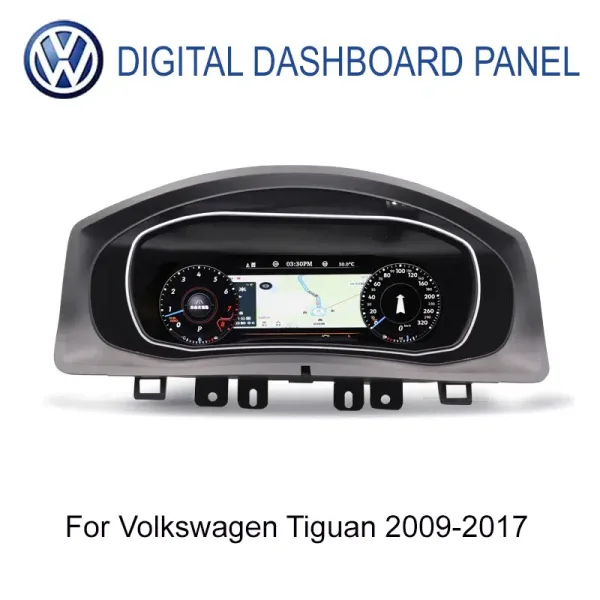
VW Tiguan Digitaal Cluster 2009–2017 · Mk1 / Type 5N
Deze installatiegids voor het VW Tiguan 5N digitale cluster ondersteunt de specifieke iKAGOO 12.3-inch IPS 1920×720 Tiguan-route met ondersteunde fabrieksrijgegevens, stuurwielintegratie en CarPlay / Android Auto / online-kaartweergave via de gematchte controller of synchronisatieroute.
Wat gebeurt er nadat je bestelt?
Vóór verzending controleert iKAGOO de voertuig-/versie-informatie die nodig is om de juiste route voor te bereiden en vraagt alleen om extra foto's indien nodig.
De meeste op voorraad zijnde bestellingen worden binnen 1–3 werkdagen verwerkt zodra de betaling en de vereiste voertuiginformatie beschikbaar zijn. De geschatte internationale levering is doorgaans 7–15 werkdagen na verzending, afhankelijk van de bestemming en route.
Verzendbeleid →Foto's/video's, connectorcontroles en installatiebewijs kunnen worden beoordeeld wanneer iets onduidelijk is. In aanmerking komende hardwarefouten vallen onder de huidige beperkte garantie van 12 maanden.
Garantiebeleid →VW Tiguan 5N digitale cluster vragen die kopers stellen voordat ze bestellen
Past dit op mijn 2014 VW Tiguan?
Ja, in de meeste correct gematchte Mk1 / Type 5N configuraties. De originele cluster- en dashboardvorm worden nog steeds gecontroleerd zodat de juiste route vóór verzending kan worden voorbereid.
Vereist dit Tiguan-cluster programmering?
Er is geen voertuigprogrammering vereist voor deze iKAGOO-route. Het geverifieerde werk is fysieke clusterverwijdering, interne overdracht/hermontage en definitieve functietest.
Blijven snelheid, toerental, brandstof, kilometerstand en waarschuwingen werken?
Ja, op de juiste route. Ondersteunde fabrieksrijgegevens blijven deel uitmaken van het digitale instrumentendisplay.
Werken de bedieningsknoppen op het stuur nog wel?
Ja, waar de ondersteunde 5N-besturingsroute correct is gematcht. Verifieer ze tijdens de definitieve functietest voordat het dashboard wordt gesloten.
Kunnen CarPlay- of Android Auto-kaarten in het cluster verschijnen?
Ja, via de ondersteunde controller-/synchronisatieroute. Het cluster toont telefoonprojectie- of kaartinformatie in plaats van te fungeren als een zelfstandige Android-headunit.
Moet ik de fabrieksbedrading doorsnijden?
De ondersteunde route is ontworpen om het opzettelijk doorknippen van de fabriekskabelboom te vermijden. Als de connector niet past, stop dan en verifieer de versie in plaats van blind pinnen aan te passen.
Kan ik bestellen zonder eerst contact op te nemen met iKAGOO?
Ja. Je kunt direct bestellen. Pre-sale beoordeling is optioneel; de voertuig-/versieroute wordt vóór verzending opnieuw gecontroleerd.
Welke informatie kan iKAGOO vóór verzending opvragen?
Modeljaar, foto's van originele cluster/dashboard, LHD/RHD en connector- of configuratiedetails wanneer nodig om de juiste route voor te bereiden.
Kan ik het zelf installeren?
Ervaren DIY is mogelijk. Dit is een L3-route omdat het originele cluster op de werkbank wordt geopend. Een auto-elektronicamonteur is veiliger voor eerste gebruikers.
Wat als iets niet werkt na de installatie?
Stop voordat u onomkeerbare wijzigingen aanbrengt. Stuur het ordernummer plus duidelijke foto's/video van het display, het connectorgebied en het waargenomen gedrag, zodat de installatie-, configuratie- en hardwareroute kunnen worden beoordeeld.
Hoe lang duurt de verzending?
Verwerking en levering zijn gescheiden. De meeste op voorraad zijnde bestellingen worden binnen 1–3 werkdagen verwerkt nadat betaling en vereiste informatie beschikbaar zijn; internationale levering is doorgaans 7–15 werkdagen na verzending.
Welke garantie biedt iKAGOO?
In aanmerking komende hardware is gedekt gedurende 12 maanden vanaf bevestigde levering onder de huidige beperkte hardwaregarantie en de daarin vermelde voorwaarden.
Gebruik deze VW Tiguan 5N digitale cluster installatiegids om de juiste route te bestellen—niet alleen het scherm dat er goed uitziet
Plaats de bestelling direct wanneer uw Tiguan de vermelde Mk1 / Type 5N-route volgt. Gebruik de optionele pre-sale beoordeling als u eerst hulp wilt; iKAGOO controleert de voertuig-/versie-informatie opnieuw vóór verzending.









Add comment
Je moet ingelogd zijn op om een reactie te plaatsen.