


Draadloze CarPlay en Android Auto op uw VW-dashboard
Gebruik vertrouwde telefoonkaarten, muziek en oproepen via het centrale scherm terwijl het dashboard-uiterlijk dicht bij de originele VW-indeling blijft.

| Gewicht | 2.5 kg |
|---|---|
| Afmetingen | 35 × 27 × 17 cm |
| Kleur:. | Zwart |
| DriveMaster: | 12GB/256GB Core A76 - CP/AA/360/DSP/5G/WiFi, 2GB/32GB-4Core A53 FM/Wifi, 4GB/64GB - 8 Core A55 - CP/AA/DSP/4G/WiFi, 8GB/128GB -8 Core A75 - CP/AA/DSP/4G/WiFi. |
| Naam | Volkswagen Android Stereo Universeel |
| Geheugen | 12GB/512GB - Core A76 - 360/DSP/5G, 2GB/32GB - 4Core FM/WiFi, 4GB/64GB - 8Core CP/AA/DSP/4G, 8+128GB 8Core CP/AA/DSP/4G |
| Kern | 4 kernen, 8 kernen |
| Schermpixels | 1024*600Pixel |
| Schermgrootte | 7.0" |
| Rugmateriaal | Plastic/Metaal |




Van: $295.00

Wij regelen de verschuldigde btw en invoerrechten voor in aanmerking komende bestellingen uit de EU en de VS. Geschatte besparing: $120-$280 .
Verzendkosten worden apart in rekening gebracht. De exacte verzendkosten worden per bestemming berekend en worden in uw winkelmandje weergegeven voordat u afrekent.
De definitieve verzending wordt bevestigd op basis van uw bezorgadres bij het afrekenen.
Compatibiliteitscontrole, volledige compatibiliteitsbescherming, 12 maanden hardwaregarantie en voortdurende ondersteuning na de installatie.
 Volledige terugbetalingsgarantie
Compatibiliteitsgarantie
Is bevestigd dat het product niet compatibel is met uw auto? Dan krijgt u het volledige aankoopbedrag terug.
→
Volledige terugbetalingsgarantie
Compatibiliteitsgarantie
Is bevestigd dat het product niet compatibel is met uw auto? Dan krijgt u het volledige aankoopbedrag terug.
→
 12-Month Hardwaregarantie
De hardwaregarantie geldt gedurende de eerste 12 maanden.
→
Langdurige ondersteuning na verkoop
Softwarebegeleiding, ondersteuning bij onderdelen en de coördinatie van reparaties blijven gekoppeld aan uw oorspronkelijke bestelling.
→
12-Month Hardwaregarantie
De hardwaregarantie geldt gedurende de eerste 12 maanden.
→
Langdurige ondersteuning na verkoop
Softwarebegeleiding, ondersteuning bij onderdelen en de coördinatie van reparaties blijven gekoppeld aan uw oorspronkelijke bestelling.
→
Ons doel is om uw bestelling goed te krijgen voordat deze ons verlaat. We verifiëren de compatibiliteit, bereiden de juiste configuratie voor en nemen alleen contact met u op als iets bevestiging nodig heeft.
VW / SEAT / Skoda Android-stereo-upgrade
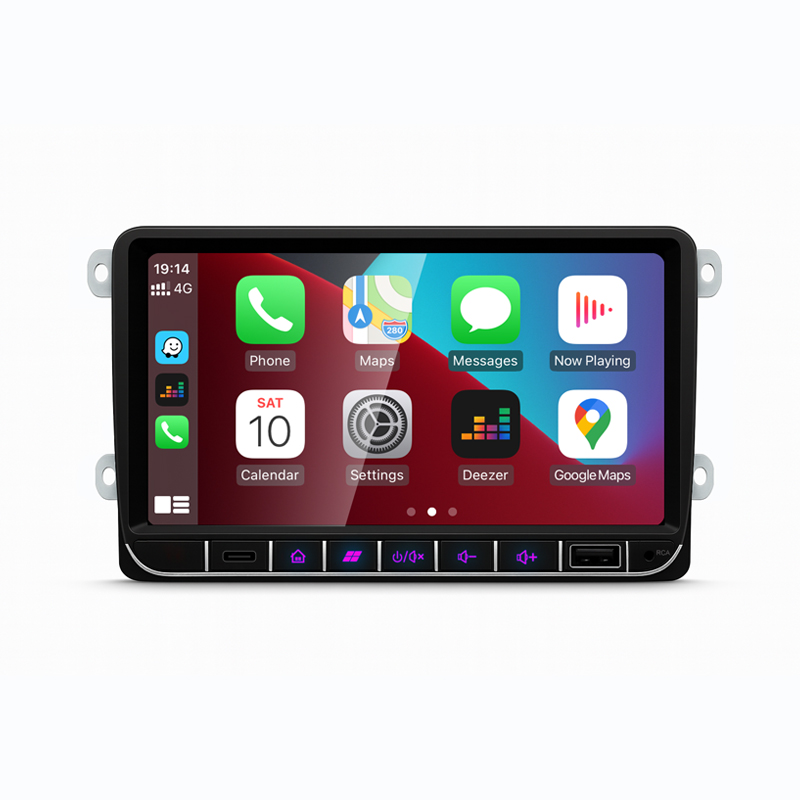
Upgrade uw originele VW-stijl dashboard met een voertuigspecifieke Android-hoofdeenheid die klaar is voor draadloze CarPlay, Android Auto, GPS-navigatie, Bluetooth, DSP-opties en integratie van fabrieksfuncties via de juiste kabelboom en CANBUS-installatie.
Eerst de uitgelichte media
Deze afbeeldingen helpen u inzicht te krijgen in het dashboard-uiterlijk, de smartphone-integratie, de lay-out van de achterconnectoren, de meegeleverde bedrading en de originele radiostijl die u moet controleren voordat u uw versie kiest.
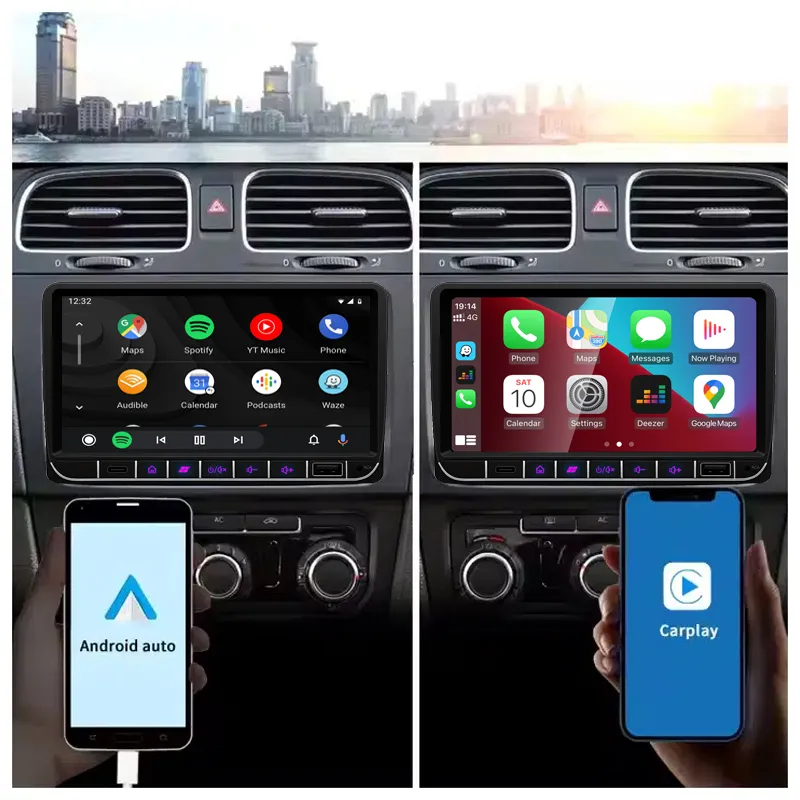
Gebruik vertrouwde telefoonkaarten, muziek en oproepen via het centrale scherm terwijl het dashboard-uiterlijk dicht bij de originele VW-indeling blijft.
Stuurwielbediening, cameraweergave, voertuiginformatie en ondersteuning voor premium audio zijn afhankelijk van het matchen van de juiste kabelboom en CANBUS-installatie voor uw voertuig.
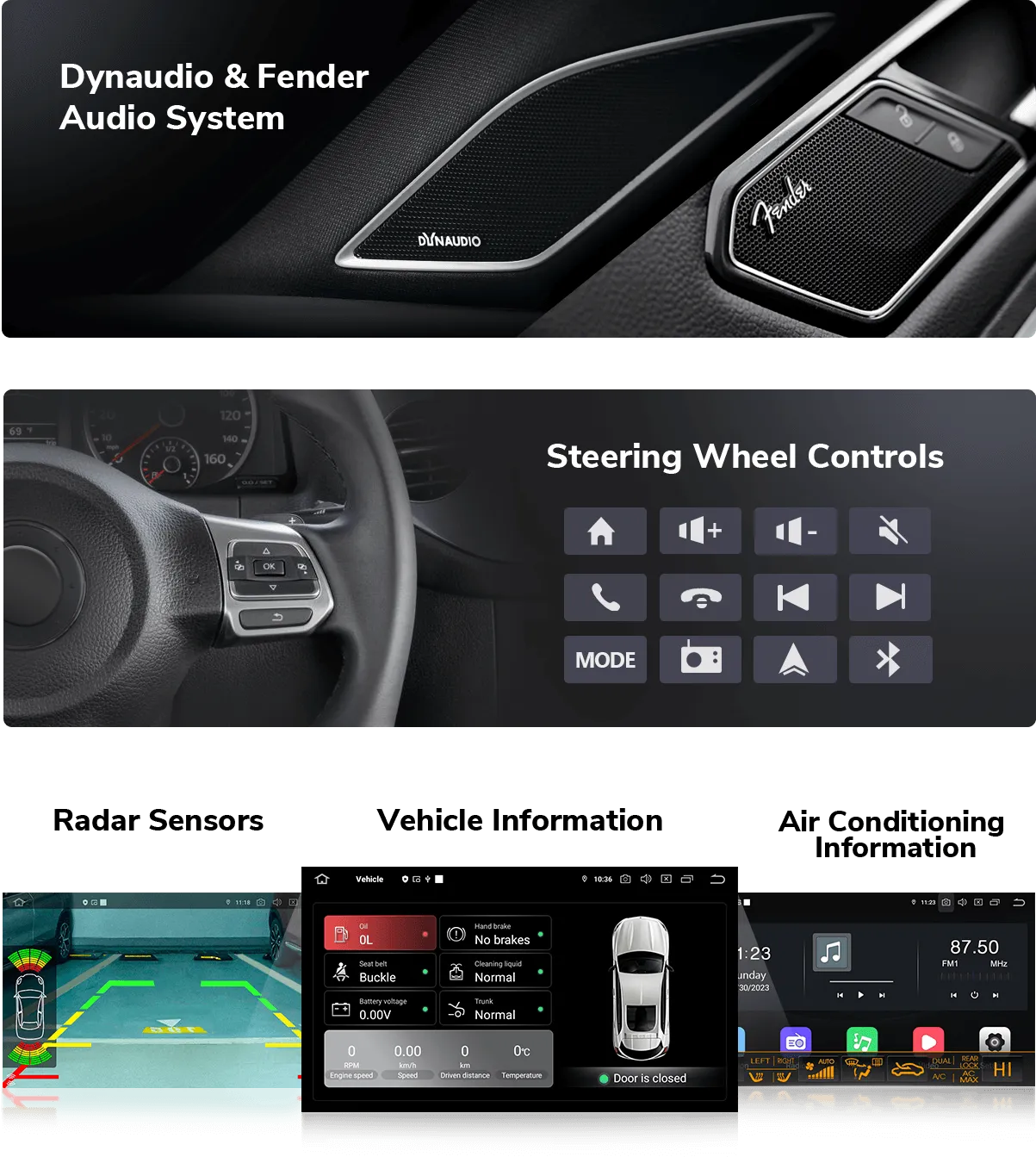
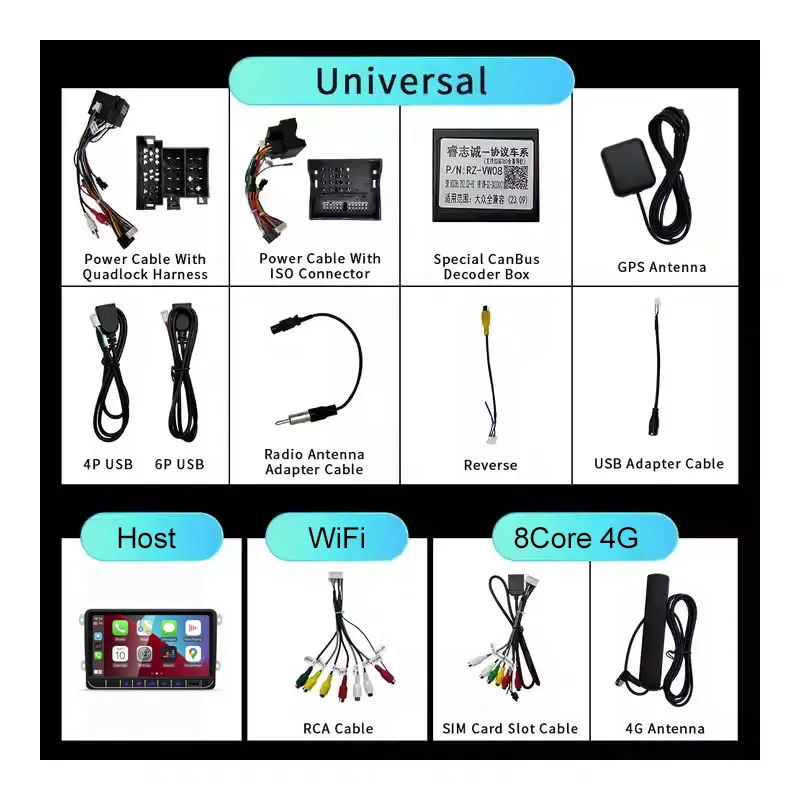
Het juiste bedradingspakket vermindert het risico op verkeerde montage en helpt de Android-stereo na installatie te communiceren met het voertuigsysteem.
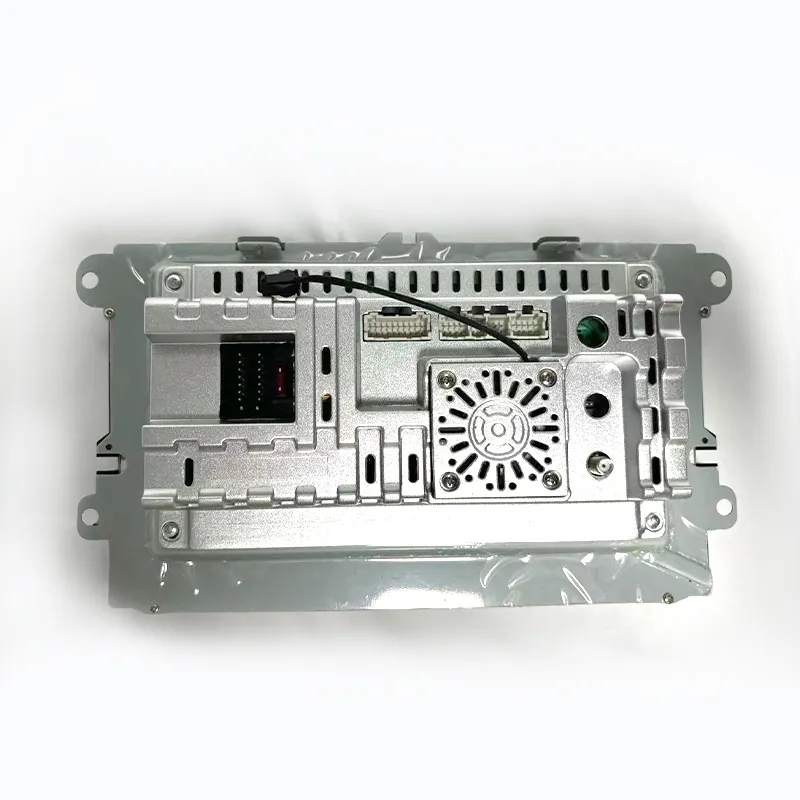
De achterkant van het apparaat toont het connectorgebied en het ontwerp van de behuizing, waardoor installateurs stroom-, antenne-, USB-, camera- en audioaansluitingen kunnen plannen voordat ze het dashboard terugplaatsen.
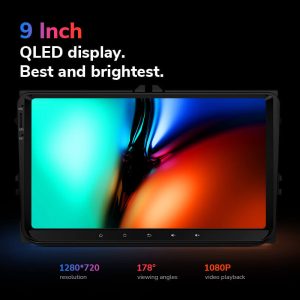
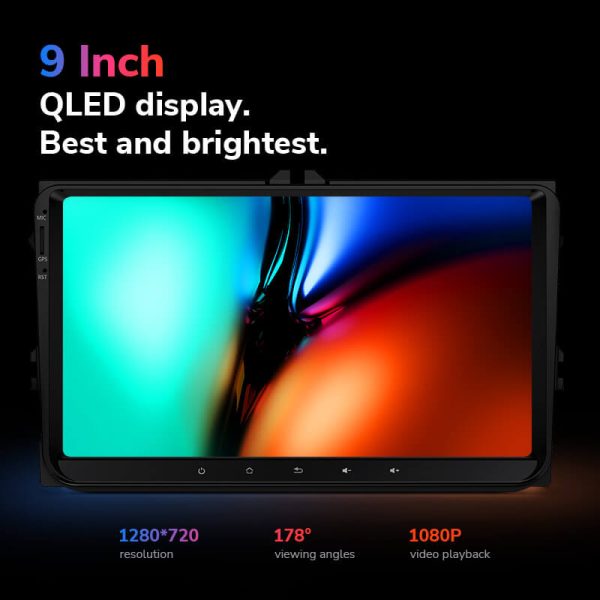
Een helder scherm verbetert de dagelijkse navigatie, muziekbediening en zichtbaarheid van de achteruitrijcamera vergeleken met een ouder fabrieksradiodisplay.
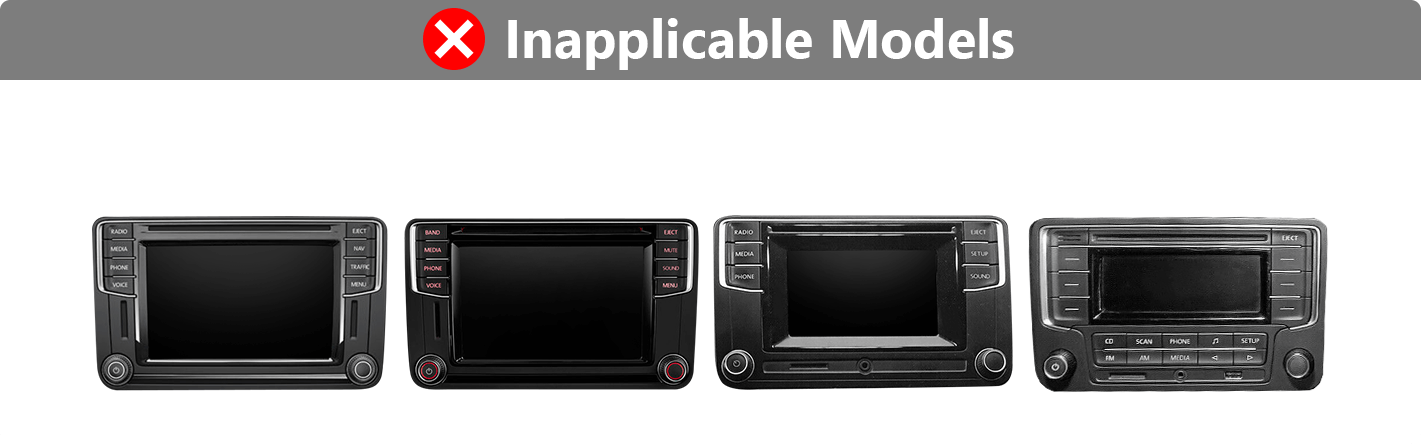
Als de vorm van uw fabrieksradio in de niet-toepasselijke groep valt, heeft u mogelijk een andere installatiekit of een andere productversie nodig.
Snel antwoord
Deze Volkswagen Android-headunit is een vervangende Android-stereo voor veel VW-, SEAT- en Skoda-dashboards, waaronder de populaire Golf, Passat, Jetta, Polo, Tiguan en aanverwante modellen. Het verbetert de oorspronkelijke radio-ervaring met draadloze CarPlay, Android Auto, GPS-navigatie, Bluetooth, app-toegang en optionele DSP-, 4G/5G- en 360-functies, afhankelijk van de geselecteerde DriveMaster-versie. Fabrieksbediening op het stuurwiel, camerafuncties, premium audio en voertuiginformatie kunnen blijven werken wanneer de juiste kabelboom en CANBUS-interface zijn voorbereid. Vermeld vóór het bestellen uw voertuigmodel, bouwjaar, dashboardfoto en de oorspronkelijke audio/camera-configuratie, zodat iKAGOO de juiste versie kan matchen. Kies voor iKAGOO wanneer u het scherm, de kabelboom en interface op uw voertuig wilt laten afstemmen in plaats van blindelings een generieke Android-radio te kopen.
Belangrijkste redenen om het product te kopen
Draadloze CarPlay en Android Auto brengen de kaarten, oproepen, berichten en muziek van de telefoon naar het centrale scherm, zonder afhankelijk te zijn van de oude fabrieksradio-interface.
Gebruik Google Maps, offline navigatie-apps en Android-apps op een groter touchscreen voor een nuttigere dagelijkse rij-opstelling.
Met de Lite-, Pro-, Ultra- en Max-versies kunt u kiezen voor instapniveau, sterkere CPU/RAM, DSP-audio, 4G/5G-netwerk of 360-camera-ondersteuning.
Ondersteuning voor originele voertuigfuncties
De ondersteuning van fabrieksfuncties hangt af van uw oorspronkelijke configuratie en de geselecteerde bekabelingsinterface. iKAGOO bereidt uw bestelling voor op basis van de voertuiginformatie die u verstrekt.
Behouden wanneer de juiste CANBUS en kabelboom overeenkomen met uw originele voertuigsysteem.
Ondersteund via de juiste camera-ingang en het bedradingspad. Het behoud van de fabriekscamera hangt af van het originele camerasysteem.
In de meeste gevallen ondersteund met de juiste interface. Premium audiosystemen moeten vóór het bestellen worden bevestigd.
CANBUS-communicatie helpt om stuurwielbediening, voertuigstatus en gerelateerde auto-informatie na installatie beschikbaar te houden.
De installatiebenadering is gebouwd rond fabrieksconnectoren en een passende kabelboom, waardoor onnodig doorknippen van de hoofdkabelboom wordt vermeden.
Achteruitrijcamera-ingang is beschikbaar in alle versies; volledig 360-beeld is voorbehouden aan de Max-versie wanneer de voertuigconfiguratie wordt ondersteund.
Voor speciale fabrieksaudiosystemen, niet-standaardcamera’s, eerdere aanpassingen door derden of ongebruikelijke regionale configuraties zijn mogelijk aanvullende aansluitinstructies nodig. Geef bij het bestellen de gevraagde voertuiggegevens door, zodat iKAGOO de juiste versie kan voorbereiden.
Voorbereiding op iKAGOO
iKAGOO controleert uw model, bouwjaar, dashboardfoto en originele systeemgegevens voordat de juiste productversie wordt aanbevolen.
Uw bestelling wordt voorbereid rond de juiste schermstijl, stroomkabelboom, CANBUS-box, camera-ingang en audio-interfacevereisten.
Stuurwielbediening, cameradisplay, versterker en voertuiggegevens worden via de juiste bedrading en installatieprocedure afgehandeld waar dit wordt ondersteund.
Het doel is om de originele hoofdkabelboom te behouden en destructieve installatie te vermijden wanneer het voertuig een ondersteunde dashboardconfiguratie gebruikt.
iKAGOO ondersteunt het controleren van verbindingen, basisinstellingen, CANBUS-selectie en functionele tests na installatie.
Uw hardware heeft een garantie van 12 maanden, inclusief aftersalesondersteuning voor vragen over het product en de configuratie na levering.
Orderverwerking
U verstrekt het model, bouwjaar, stuurpositie, foto van de originele radio en details van het originele systeem.
iKAGOO bereidt de juiste voedingskabelboom, CANBUS-decoder, USB/GPS-accessoires en camera-aansluitrichting voor.
Kies Lite, Pro, Ultra of Max op basis van RAM, opslag, DSP, netwerk en 360-cameravereisten.
Test na installatie de radio, het geluid, de stuurwielbediening, de camera, CarPlay, Android Auto, GPS en voertuiggegevens voordat u de panelen weer terugplaatst.
iKAGOO-aankoopbeoordeling
Deze upgrade heeft grote dagelijkse gebruikswaarde als uw originele VW-radio moderne navigatie, draadloze telefoonintegratie of bruikbare app-ondersteuning mist.
Bekijk de normDe juiste kabelboom en CANBUS-installatie zijn essentieel voor stuurwielbediening, audio, camera en het behoud van voertuiggegevens.
Bekijk de normAanbevolen voor ervaren doe-het-zelvers of professionele installateurs van car-audio, aangezien het dashboard moet worden verwijderd, er bedrading moet worden aangelegd en de CANBUS moet worden geconfigureerd.
Bekijk de normMedia-item
Gebruik iPhone-kaarten, oproepen en muziek via het headunit-scherm.
Verbind Android-telefoons voor navigatie, oproepen en app-bediening.
Pro-, Ultra- en Max-versies voegen DSP-ondersteuning toe voor betere geluidsaanpassing.
Geselecteerde versies ondersteunen mobiele data voor verbonden navigatie en apps.
Verbind telefoons en audioapparaten voor oproepen en mediaweergave.
Gebruik FM- of FM/AM-radio, afhankelijk van de geselecteerde DriveMaster-versie.
Voeg het display van de achteruitrijcamera toe of behoud het via de juiste cameraverbinding.
De DriveMaster-serie wordt vermeld met Android 13-systeemondersteuning.
Aankoopvergelijking
Specificaties
Selecteer de versie op basis van uw prestatie-, opslag-, audio- en camerabehoeften.
Versie selecteren
Kies dit voor eenvoudige navigatie, muziek, Bluetooth en telefoonprojectie wanneer het budget de belangrijkste prioriteit is.
Kies dit voor sterkere dagelijkse prestaties, DSP-audio en 4G-ondersteuning zonder over te stappen op de duurdere versies.
Kies dit voor beter multitasken, meer RAM/opslag, DSP, netwerkondersteuning en een comfortabelere dagelijkse Android-ervaring.
Kies dit als je de topconfiguratie, sterkere uitbreidingsmogelijkheden en ondersteunde 360-cameraintegratie nodig hebt.
Voertuigcompatibiliteit
Dit product is bedoeld voor veel VW-platformdashboards. Controleer de originele radiovorm, het modeljaar en de audio/camera-installatie vóór het bestellen.
Vergelijk de vorm van uw fabrieksradio voordat u bestelt. De juiste dashboardstijl helpt iKAGOO de juiste versie voor te bereiden.
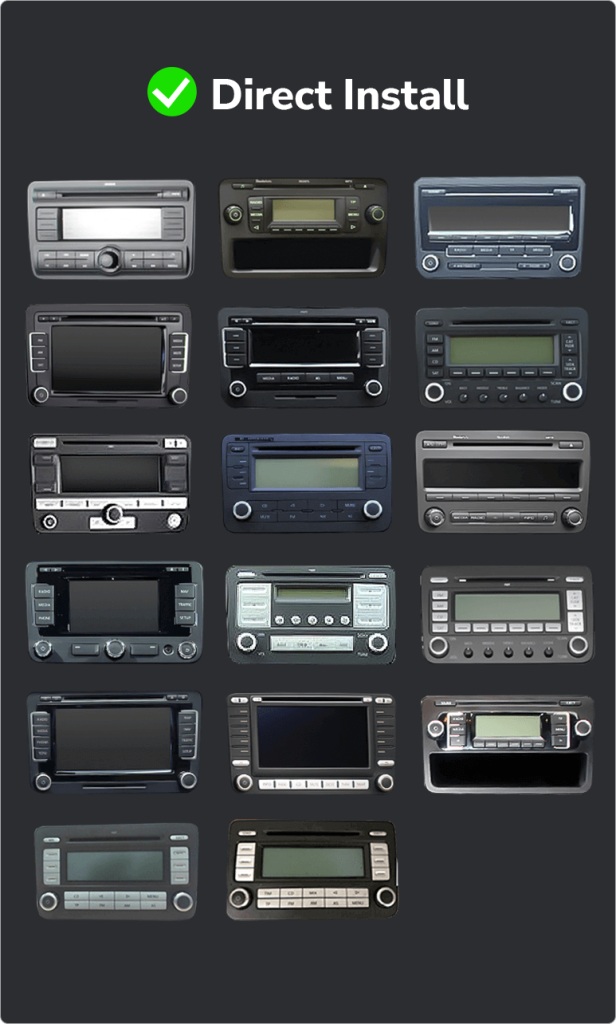
Als uw dashboard overeenkomt met deze vormen, bestel dan niet blindelings. Mogelijk heeft u een andere kit of een ander stereoformaat nodig.
Kabelboom, interface en accessoires
Verbindt de headunit met de voeding en het luidsprekersysteem van het voertuig via de voorbereide bedrading.
Helpt de stuurwielbediening, voertuiggegevens en fabrieksinteractie te behouden waar de voertuigconfiguratie dit ondersteunt.
Ondersteunt navigatieontvangst en USB-toegang voor telefoonverbinding, media, accessoires en updates.
Ondersteunt achteruitrijcamera-ingang, met extra controles nodig voor fabriekscamerasystemen en 360-cameraopstellingen.
Inbegrepen of gebruikt op geselecteerde versies die mobiele netwerkverbinding ondersteunen.
DSP-, versterker- en audio-uitgangsgedrag hangt af van de geselecteerde versie en het originele fabrieksaudiosysteem.
Installatiehandleiding
Dit is een Level 3 — Gevorderde DIY-installatie. Ervaren DIY-gebruikers kunnen het installeren, maar een professionele auto-audio-installateur wordt aanbevolen als u zich niet prettig voelt bij het verwijderen van panelen en het controleren van bedrading.
Ondersteuning na aankoop
Uw bestelling wordt verzonden met een trackingnummer. De levertijd is afhankelijk van de bestemming en de gekozen verzendmethode.
Hardwarefouten vallen gedurende 12 maanden onder de garantievoorwaarden van iKAGOO.
Er is ondersteuning beschikbaar voor het controleren van verbindingen, het instellen van CANBUS, het testen van basisfuncties en vragen over de configuratie.
Veelgestelde vragen
In de meeste gevallen wel, als uw modeljaar en de vorm van de originele radio overeenkomen met de ondersteunde VW-platform dashboardlijst. Stuur uw dashboardfoto voor het bestellen zodat iKAGOO de juiste versie kan bevestigen.
Ja, de DriveMaster-versies die voor dit product worden vermeld, ondersteunen zowel bekabelde als draadloze CarPlay en Android Auto.
Ja, de bedieningsknoppen op het stuur blijven werken als de juiste kabelboom en CANBUS-decoder overeenkomen met de oorspronkelijke configuratie van uw auto.
Dat hangt ervan af, want de camerasystemen af fabriek verschillen per model, bouwjaar en type bedrading. Geef bij uw bestelling de originele camera-gegevens door.
In de meeste gevallen wel, maar bij hoogwaardige audiosystemen moet vóór verzending worden gecontroleerd of de juiste audio-interface en bekabeling aanwezig zijn.
Nee, bij de beoogde installatie wordt gebruikgemaakt van een bijpassende kabelboom en fabrieksconnectoren. Stop met de installatie als het nodig lijkt om de hoofdkabelboom van het voertuig door te knippen.
Het hangt ervan af. Lite is voor basisgebruik, Pro voegt betere dagelijkse prestaties en DSP toe, Ultra is beter voor zwaarder Android-gebruik, en Max is voor topconfiguratie en ondersteunde 360-camerabehoeften.
Ja, de Max-versie is de versie die wordt vermeld voor volledige 360°-ondersteuning. Of de 360°-functionaliteit daadwerkelijk behouden blijft, hangt nog steeds af van het camerasysteem en de bedrading van je auto.
Stuur in de meeste gevallen het model en bouwjaar van uw auto, de stand van het stuur, een foto van het dashboard, een foto van de originele radio, het type fabriekscamera en informatie over het fabrieksaudiosysteem.
Ja, dat is logisch als je een voertuigspecifieke voorbereiding wilt. iKAGOO controleert het dashboard, de kabelboom, het CAN-busnetwerk en het functiebehoudspad voordat het de juiste versie aanbeveelt.
Klaar voor een upgrade
Kies uw DriveMaster-versie, bevestig uw dashboardstijl en stuur de vereiste voertuiginformatie zodat iKAGOO het juiste scherm, de juiste kabelboom en interface voor uw VW, SEAT of Skoda kan voorbereiden.
Je moet ingelogd zijn om een recensie te kunnen plaatsen.

Duidelijke informatie over voertuigcompatibiliteit, ordervoorbereiding, internationale levering, garantie, retourneren en after-sales ondersteuning.
Voertuigspecifieke elektronica vereist de juiste versie, bedrading en configuratie. Ons proces is ontworpen om vermijdbare compatibiliteits- en installatieproblemen te verminderen.
Voertuigmodel, bouwjaar, origineel systeem en relevante configuratie-informatie kunnen vóór aankoop worden gecontroleerd om het risico te verkleinen dat de verkeerde versie wordt gekozen.
Vóór verzending wordt de bestelling gecontroleerd aan de hand van de bevestigde voertuiginformatie, zodat de juiste versie, configuratie en vereiste voertuigspecifieke onderdelen kunnen worden voorbereid.
Ons doel is om uw bestelling goed te krijgen voordat deze ons verlaat. Wij controleren de compatibiliteit, bereiden de juiste configuratie voor en nemen alleen contact met u op als er nog iets bevestigd moet worden.
Een praktische samenvatting van de belangrijkste voorwaarden die van toepassing zijn op voertuigspecifieke iKAGOO-bestellingen.
De meeste iKAGOO-bestellingen worden verzonden vanuit onze fulfilment locatie in China nadat de productconfiguratie en voertuig informatie zijn gecontroleerd.
De normale orderverwerking is ongeveer 1-3 werkdagen. De geschatte levering na verzending is over het algemeen:
Douaneafhandeling, feestdagen, weer, vertragingen van vervoerders en bezorging in afgelegen gebieden kunnen deze schattingen beïnvloeden.
Standaard internationale verzending omvat normaal gesproken geen btw van het bestemmingsland, invoerrechten, makelaarskosten of douaneafhandelingskosten.
Voor in aanmerking komende bestemmingen in de Europese Unie, DDP-verzending kan beschikbaar zijn. Importgerelateerde kosten zijn alleen inbegrepen wanneer DDP is geselecteerd bij het afrekenen of schriftelijk bevestigd door iKAGOO vóór verzending.
Wanneer DDP niet is geselecteerd, zijn de kosten die door de lokale douane of de vervoerder worden geïnd, normaliter de verantwoordelijkheid van de ontvanger.
Express- of versnelde verzending kan beschikbaar zijn voor geselecteerde producten en bestemmingen. Beschikbaarheid, vervoerder en eventuele extra kosten worden vóór verzending bevestigd.
Afhankelijk van de route en het producttype kan iKAGOO gebruikmaken van DHL, FedEx, UPS, EMS, 4PX of een andere trackbare logistieke dienstverlener.
Na verzending worden het trackingnummer of de trackinglink normaal gesproken naar het e-mailadres gestuurd dat voor de bestelling is gebruikt. Het kan enkele werkdagen duren voordat trackingupdates verschijnen tijdens internationale overdrachten tussen vervoerders.
De teruggaafgeschiktheid hangt af van de reden voor retour, product conditie, installatiestatus, ondersteunend bewijs en of de retour is goedgekeurd door iKAGOO.
Voor een goedgekeurde retour zonder defecten moet het product normaal gesproken ongebruikt, niet geïnstalleerd, compleet en geschikt voor doorverkoop blijven. De klant is over het algemeen verantwoordelijk voor de goedgekeurde retourverzendkosten.
Originele verzendkosten, DDP, btw, douanerechten en andere logistieke kosten zijn over het algemeen niet restitueerbaar, tenzij wettelijk vereist of anderszins bevestigd door iKAGOO.
Stuur een product niet terug voordat u een goedgekeurd retouradres en retourinstructies van iKAGOO heeft ontvangen.
Extra bescherming kan van toepassing zijn wanneer iKAGOO de voertuigcompatibiliteit heeft beoordeeld, de klant nauwkeurige voertuiginformatie heeft verstrekt en redelijke installatie- en diagnosestappen zijn uitgevoerd.
Als iKAGOO bevestigt dat er geen redelijke technische oplossing beschikbaar is en het probleem wordt gemeld binnen 7 kalenderdagen na levering, kan de klant mogelijk in aanmerking komen voor een terugbetaling van de productprijs zonder dat het product geretourneerd hoeft te worden.
Originele verzendkosten, DDP, btw, douanerechten en andere kosten van derden zijn niet inbegrepen in deze terugbetaling van de productprijs.
In aanmerking komende producten omvatten een 12 maanden beperkte hardwaregarantie die geverifieerde productiefouten en in aanmerking komende hardwarestoringen onder normaal gebruik dekt.
Afhankelijk van het geverifieerde probleem kan ondersteuning bestaan uit diagnose op afstand, configuratiehulp, vervangende onderdelen, reparatie, vervanging, gedeeltelijke terugbetaling of volledige terugbetaling.
Inspectie of onderzoek door een derde partij leidt niet automatisch tot verval van de volledige garantie. Schade veroorzaakt door ongeautoriseerde reparatie, onjuiste modificatie, kapotte circuits, onjuiste hermontage, onjuiste bedrading, stootschade, binnengedrongen water of verkeerd gebruik wordt echter normaal gesproken niet gedekt.
Neem vóór het demonteren, modificeren of repareren contact op met iKAGOO, zodat de juiste diagnostische procedure kan worden verstrekt.
Neem contact op met iKAGOO binnen 7 kalenderdagen na levering en bewaar de originele verpakking, verzendlabel, accessoires en het product.
Gelieve duidelijke foto’s of video’s aan te leveren waarop het volgende te zien is:
Na verificatie kan iKAGOO een verzending van ontbrekende onderdelen, vervanging, reparatie, restitutie of een andere redelijke oplossing regelen.
Neem zo snel mogelijk en vóór installatie contact op met iKAGOO. Voor adres-, voertuigconfiguratie- of productwijzigingen kunt u ons het beste binnen 12 uur na het plaatsen van de bestelling.
Een ruil of retour kan worden goedgekeurd wanneer een onjuist geselecteerd product ongebruikt, niet geïnstalleerd, compleet en geschikt voor wederverkoop blijft. Klanten zijn doorgaans verantwoordelijk voor relevante verzendkosten en prijsverschillen.
Voertuigspecifieke producten kunnen kort na betaling in inkoop, programmering, testen of configuratie gaan. Zodra de voorbereiding of verzending is gestart, kan annulering niet langer mogelijk zijn, of kunnen redelijke reeds gemaakte kosten worden afgetrokken.
De inhoud van het pakket varieert per product, voertuigmodel, fabriekssysteem en geselecteerde configuratie.
Afhankelijk van het product kan het pakket het hoofdapparaat, voertuigspecifieke bedradingskabels, CANBUS-interface, adapters, USB-kabels, antennes, microfoons, montagemateriaal of andere vereiste installatieaccessoires bevatten.
Raadpleeg de relevante productfoto's, specificaties en orderbevestiging voor de exacte inhoud van uw bestelling.
U kunt iKAGOO bereiken via het contactformulier op de website, WhatsApp of andere beschikbare ondersteuningskanalen. De typische responstijd is binnen 24 werkuren.
Neem voor een snellere technische diagnose uw bestelnummer, voertuigmodel en -jaar, relevante foto's van het fabriekssysteem, productfoto's en een duidelijke video met het probleem op.
Betalingen worden verwerkt via de veilige betaalmethoden die tijdens het afrekenen worden weergegeven.
Beschikbare kaart-, portemonnee- en termijnopties kunnen variëren per land, valuta, betalingsprovider en klantgeschiktheid.
Termijndiensten, inclusief opties aangeboden door PayPal of een andere betalingsprovider, blijven onderworpen aan de regionale beschikbaarheid en goedkeuringsvereisten van die provider.
Deze sectie is een vereenvoudigde klantgids. De volledige gepubliceerde beleidspagina's, orderbevestiging en toepasselijke consumentenwetgeving hebben voorrang als de formulering verschilt.
De Volkswagen Amarok Digital Cockpit voor de modellen uit 2017-2020 vernieuwt uw fabrieksdashboard met een OE...
Geef het digitale instrumentenpaneel van je Volkswagen VW Passat B6, B7 of CC een upgrade met een nie...
Van: $295.00
De definitieve verzending wordt bevestigd op basis van uw bezorgadres bij het afrekenen.

Selecteer wat je van plan bent te kopen. We tonen alleen de details die nodig zijn voor dat product.
We bekijken de details en sturen de aanbevolen productversie naar je e-mail sturen.
We gebruiken essentiële cookies om de site veilig en goed te laten werken. Met uw toestemming kunnen we ook analytische cookies gebruiken om de browse-ervaring te verbeteren. Zie onze Privacybeleid.




John.Doe -
Ik heb onlangs de Ikagoo Android-stereo in mijn 2012 VW Golf geïnstalleerd, en de verbetering is opmerkelijk. De installatie was eenvoudig en de unit past naadloos in het dashboard. Het 10.33″ QLED-display is levendig en responsief, en de draadloze CarPlay- en Android Auto-functies werken vlekkeloos. Ik waardeer ook de ingebouwde DSP voor verbeterde audiokwaliteit. Al met al een aanzienlijke upgrade die zowel de functionaliteit als de esthetiek van mijn auto verbetert.
Jiménez Andrés -
Ik heb deze Android-unit in mijn Volkswagen geïnstalleerd en ben zeer tevreden. Het display is helder en de integratie met het originele dashboard is perfect. GPS-navigatie en compatibiliteit met draadloze CarPlay maken het rijden veiliger en aangenamer. De installatie was eenvoudig en de interface is intuïtief.