


Hoe installeer je een digitaal cluster voor VW Jetta (2011–2018): PCB-overdracht, kalibratie en instelling
Stap-voor-stap installatieoverzicht
Deze stapsgewijze handleiding helpt u bij het installeren van een digitaal instrumentencluster voor de Volkswagen Jetta op ondersteunde Jetta-analoge clusterapplicaties. Het behandelt installatiestappen, voorbereiding van het voertuig, inhoud van het pakket, kalibratielogica en de controles na installatie om te bevestigen dat de installatie correct is uitgevoerd.
Belangrijk: Controleer de exacte jaargroep, de originele analoge clusterstijl en de configuratie voor links- of rechtsrijdend verkeer voordat u bestelt of installeert.
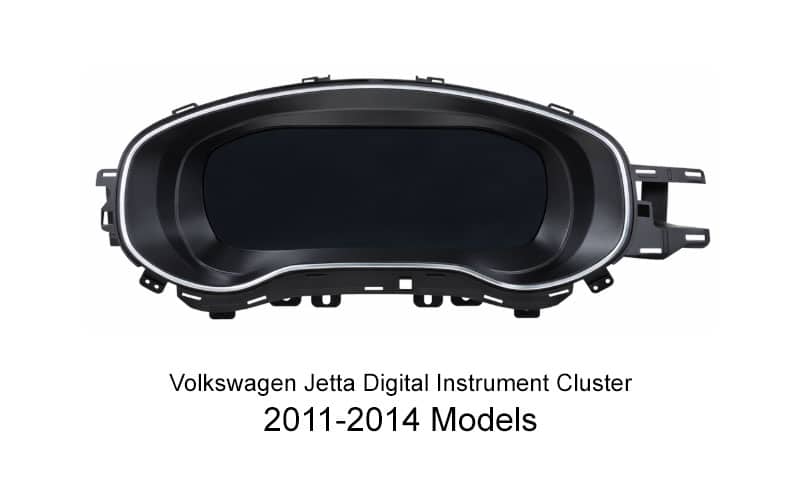
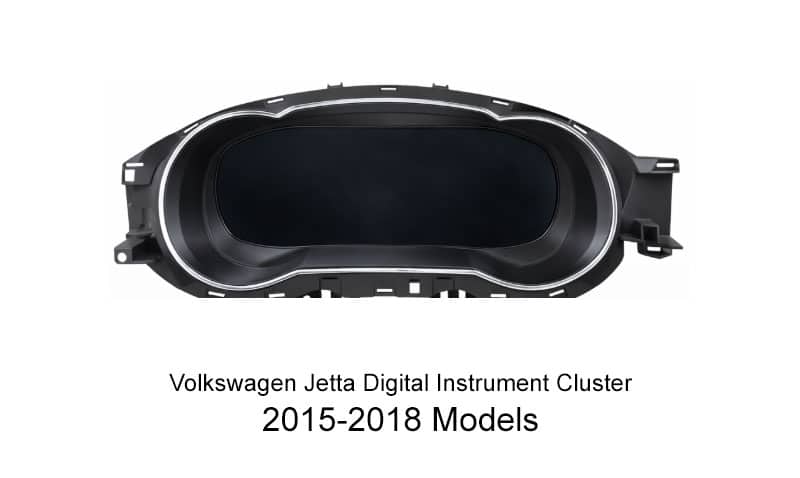
De Volkswagen Jetta Digitaal Instrumentenpaneel upgrade is ontworpen voor bestuurders die een modernere dashboardervaring willen met behoud van het uiterlijk van de OEM-cabine. Voor veel Volkswagen Jetta-eigenaren is de belangrijkste waarde niet alleen het scherm zelf. Het is de schonere lay-out, het scherpere informatiedisplay en de verfijndere digitale presentatie die er nog steeds geïntegreerd uitziet met de auto.
Deze installatiehandleiding is geschreven voor wereldwijde kopers, met name eigenaars in Noord-Amerika, Europa, Australië en andere overzeese markten die de installatiestappen, voorbereidende werkzaamheden, inhoud van het pakket en veelvoorkomende aanpassingen na de installatie willen begrijpen. Omdat het product in verschillende versies wordt aangeboden, moeten installateurs nog steeds controleren of de juiste montage-uitvoeringen worden gebruikt. jaargroep, stuurzijde, en oorspronkelijk clustertype voordat het werk begint.
Wat moet worden bevestigd voordat u bestelt of installeert?
Compatibiliteitsopmerkingen Voordat u bestelt
- Deze gids is bedoeld voor ondersteunde Jetta analoge-clustertoepassingen.
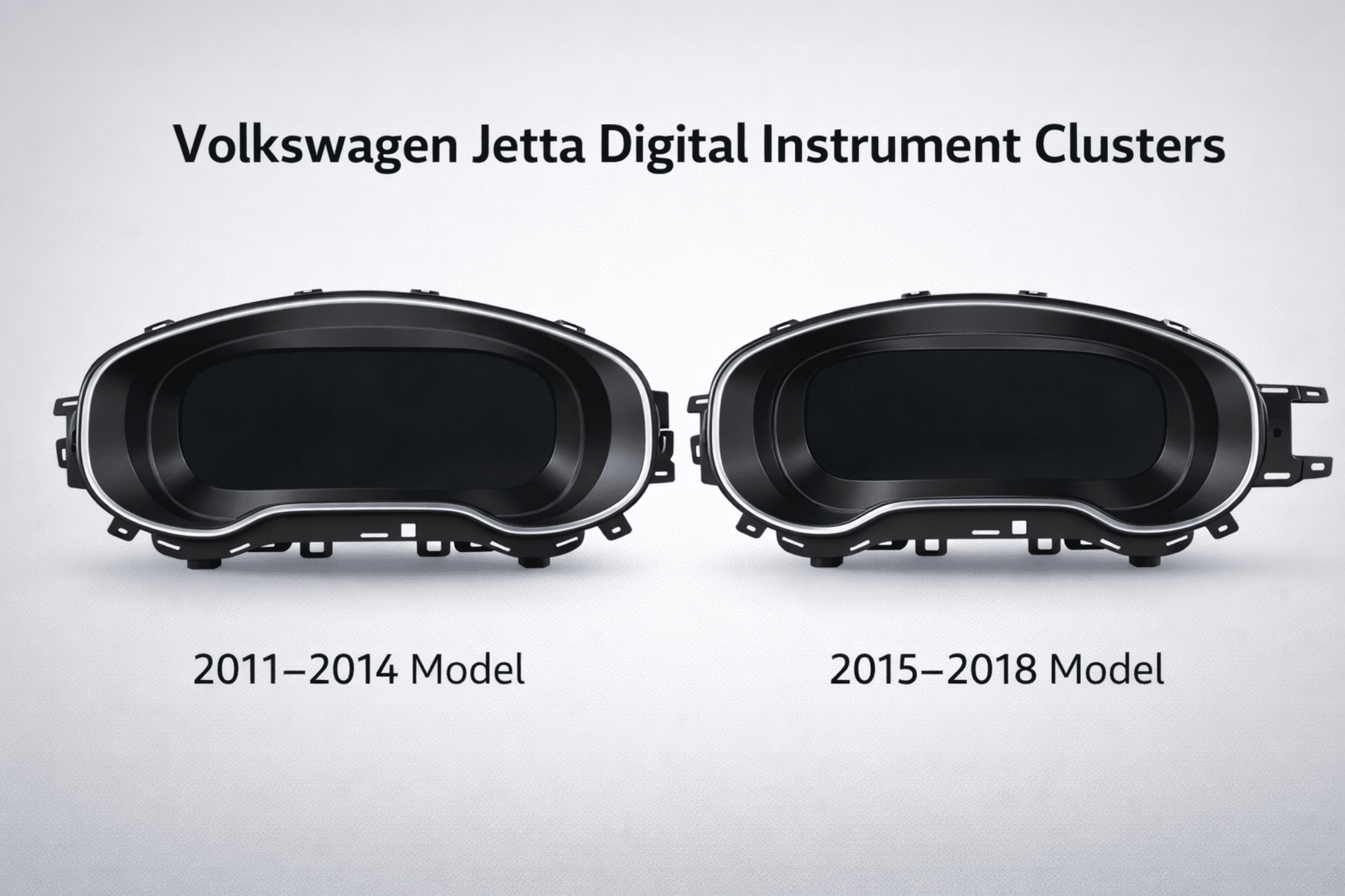
- De geselecteerde versie moet overeenkomen met de werkelijke modeljaargroep en de fysieke vorm van de oorspronkelijke cluster.
- De versies met linkse en rechtse besturing zijn niet uitwisselbaar.
- Deze installatie vereist over het algemeen dat het originele instrumentencluster wordt overgebracht of gemigreerd PCB/moederbord (en eventueel benodigde originele subprintplaat of component) naar de behuizing van het nieuwe digitale cluster. De exacte lay-out van de printplaat verschilt per bouwjaar en uitvoering, bevestig daarom vóór installatie foto's van het originele cluster.
- Het behoud van waarschuwingslogica, informatiedisplay van de carrosserie en gedrag van stuurwielknoppen kan variëren afhankelijk van het originele uitrustingsniveau en de ondersteunde configuratie.
- Voordat je tot aankoop overgaat, kun je het beste het bouwjaar, de foto van het cluster en de richting van het stuurwiel samen controleren in plaats van alleen af te gaan op de modelnaam.
- Bevestig de exacte versie, bouwjaargroep en stuuroriëntatie op de VW Jetta Digital Cluster 2011–2018 productpagina voordat u bestelt.
Checklist van benodigde hulpmiddelen en uitrusting
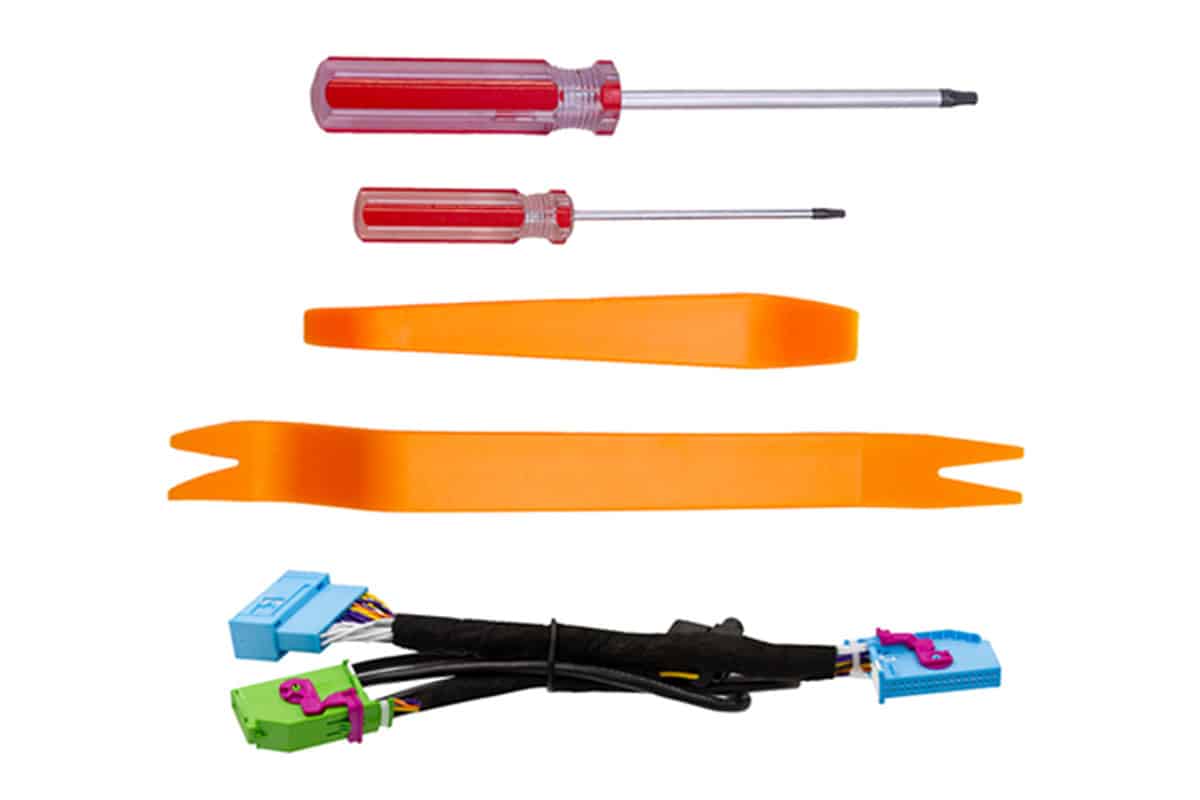
Voordat u begint met het demonteren, moet u de volgende gereedschappen gereedmaken om het risico op schade aan de trim te verminderen en het installatieproces schoon en gecontroleerd te houden.
- Set niet-schurende kunststof wrikgereedschappen: Wordt gebruikt om de OEM dashboardbehuizing te verwijderen zonder krassen op de omringende panelen te maken.
- T20 Torx-schroevendraaier: Nodig voor de originele bevestigingsschroeven van het cluster. Een magnetische punt is handig.
- Microvezeldoek: Handig voor het afdekken van de stuurkolombekleding en nabijgelegen oppervlakken tijdens demontage en montage.
Wat is inbegrepen in het pakket?
Controleer voor de installatie de inhoud van de verpakking en plaats alle onderdelen op een schoon werkoppervlak. Het pakket moet de juiste versie van het digitale cluster bevatten en de belangrijkste installatieaccessoires die nodig zijn voor de klus.
Hoe verbetert deze upgrade de originele clusterervaring?
Niet-destructief bedradingsconcept
De bevestigde installatie vermijdt het doorknippen of splitsen van de fabriekskabelboom op de geverifieerde route. Het originele cluster wordt nog steeds verwijderd en geopend, en de originele PCB/mainboard en vereiste componenten worden overgebracht naar het nieuwe digitale cluster.
Stabiele besturingslogica
Ontworpen voor stabiel opstartgedrag en normaal dagelijks gebruik in plaats van opzichtige maar onstabiele dashboardmodificatie.
10.3-inch HD-scherm
De resolutie van 1920 × 720 biedt een schonere en modernere digitale dashboardpresentatie dan het oorspronkelijke mechanische cluster.
OEM-stijl integratie
Ontworpen om een fabrieksmatige pasvorm en belangrijke displaylogica te behouden waar dit wordt ondersteund door de toepassing en de originele voertuigconfiguratie.
Hoe is dit LCD-scherm getest op betrouwbaarheid?
De volgende testsamenvatting is gebaseerd op de meegeleverde productvalidatietabel en is bedoeld als referentie voor buitenlandse kopers die een duidelijker beeld willen krijgen van de elektrische, omgevings-, anti-interferentie- en duurzaamheidscontroles van deze Volkswagen LCD-instrumentencluster.
| NEE. | TESTITEM | TESTOMSTANDIGHEDEN | RESULTAAT |
|---|---|---|---|
| 1 | Basisfunctietest | Bevestig alle kernfuncties één voor één. | PASS |
| 2 | Test van het werkspanningsbereik | Werkt normaal binnen het voedingsbereik van 9V tot 16V. | PASS |
| 3 | Rimpelingstest | Hoogfrequente rimpeltest en laagfrequente rimpeltest. | PASS |
| 4 | Vermogensvariatietest | Gesimuleerde omstandigheden met stroomschommelingen in auto's. | PASS |
| 5 | Elektrostatische ontladingstest | Validatie van luchtafvoer en contactafvoer onder aangedreven en niet-aangedreven omstandigheden. | PASS |
| 6 | Opslag bij lage temperatuur | 48 uur bewaard bij -40 °C. | PASS |
| 7 | Werking bij lage temperatuur | Werkt 24 uur in een omgeving van -30°C. | PASS |
| 8 | Werking bij hoge temperaturen | Werkt 24 uur in een omgeving van 70°C. | PASS |
| 9 | Opslag bij hoge temperatuur | 48 uur bewaard in een omgeving van 85°C. | PASS |
| 10 | Test elektromagnetische interferentie | Geen storing op de geteste eenheid tijdens de gespecificeerde communicatieconditie. | PASS |
| 11 | Herhaalde aan/uit-test | Duurtest met herhaalde vermogenscycli. | PASS |
| 12 | Stresstest software | Continue CAN-gegevensstresstest. | PASS |
| 13 | DDR en Flash lezen/schrijven stresstest | Stresstest voor opslaghardware voor lezen/schrijven. | PASS |
Basisfunctietest
Bevestig alle kernfuncties één voor één.
Test van het werkspanningsbereik
Werkt normaal binnen het voedingsbereik van 9V tot 16V.
Rimpelingstest
Hoogfrequente rimpeltest en laagfrequente rimpeltest.
Vermogensvariatietest
Gesimuleerde omstandigheden met stroomschommelingen in auto's.
Elektrostatische ontladingstest
Validatie van luchtafvoer en contactafvoer onder aangedreven en niet-aangedreven omstandigheden.
Opslag bij lage temperatuur
48 uur bewaard bij -40 °C.
Werking bij lage temperatuur
Werkt 24 uur in een omgeving van -30°C.
Werking bij hoge temperaturen
Werkt 24 uur in een omgeving van 70°C.
Opslag bij hoge temperatuur
48 uur bewaard in een omgeving van 85°C.
Test elektromagnetische interferentie
Geen storing op de geteste eenheid tijdens de gespecificeerde communicatieconditie.
Herhaalde aan/uit-test
Duurtest met herhaalde vermogenscycli.
Stresstest software
Continue CAN-gegevensstresstest.
DDR en Flash lezen/schrijven stresstest
Stresstest voor opslaghardware voor lezen/schrijven.
Hoe moet het voertuig worden voorbereid voordat het originele instrumentenpaneel wordt verwijderd?
Een goede voorbereiding is belangrijk omdat installatieproblemen vaak al beginnen voordat het oorspronkelijke cluster is verwijderd. Voer eerst de volgende stappen uit.
Voordat u de originele PCB/mainboard van het cluster behandelt
- Koppel de voertuigstroom los of beveilig deze zoals passend bij de gedocumenteerde procedure voordat u aan het cluster werkt.
- Bescherm de originele PCB tegen statische ontlading; pak de printplaten alleen bij de randen vast.
- Fotografeer de connector en de oriëntatie van de printplaat voordat u iets verwijdert.
- Voed het nieuwe digitale cluster niet voordat de vereiste migratie van de originele printplaat is voltooid, tenzij de exacte productprocedure die bij uw versie wordt geleverd anders aangeeft.
Stap 1: Ontlaad statische elektriciteit
Maak uw lichaam vrij van statische elektriciteit voordat u de printplaat demonteert en installeert. Houd de printplaat bij het hanteren alleen bij de randen vast en vermijd direct contact met elektronische onderdelen.
Stap 2: Laat de originele instrumentzoemer zitten
De originele zoemer of luidspreker van de instrumentengroep mag niet worden verwijderd. Verwijdering kan een storingswaarschuwing in de instrumentengroep veroorzaken.
Stap 3: Waarschuwingsinstellingen aanpassen voor verwijdering
Voordat u het originele cluster verwijdert, moet u eerst de winterbandenwaarschuwing en de snelheidswaarschuwing op hun maximale waarden instellen en vervolgens beide functies uitschakelen in het menu van het multifunctionele display.
Hoe voltooi ik de stap voor het instellen van de eerste waarschuwing?
De originele Jetta-instrumentencluster-PCB/mainboard overbrengen
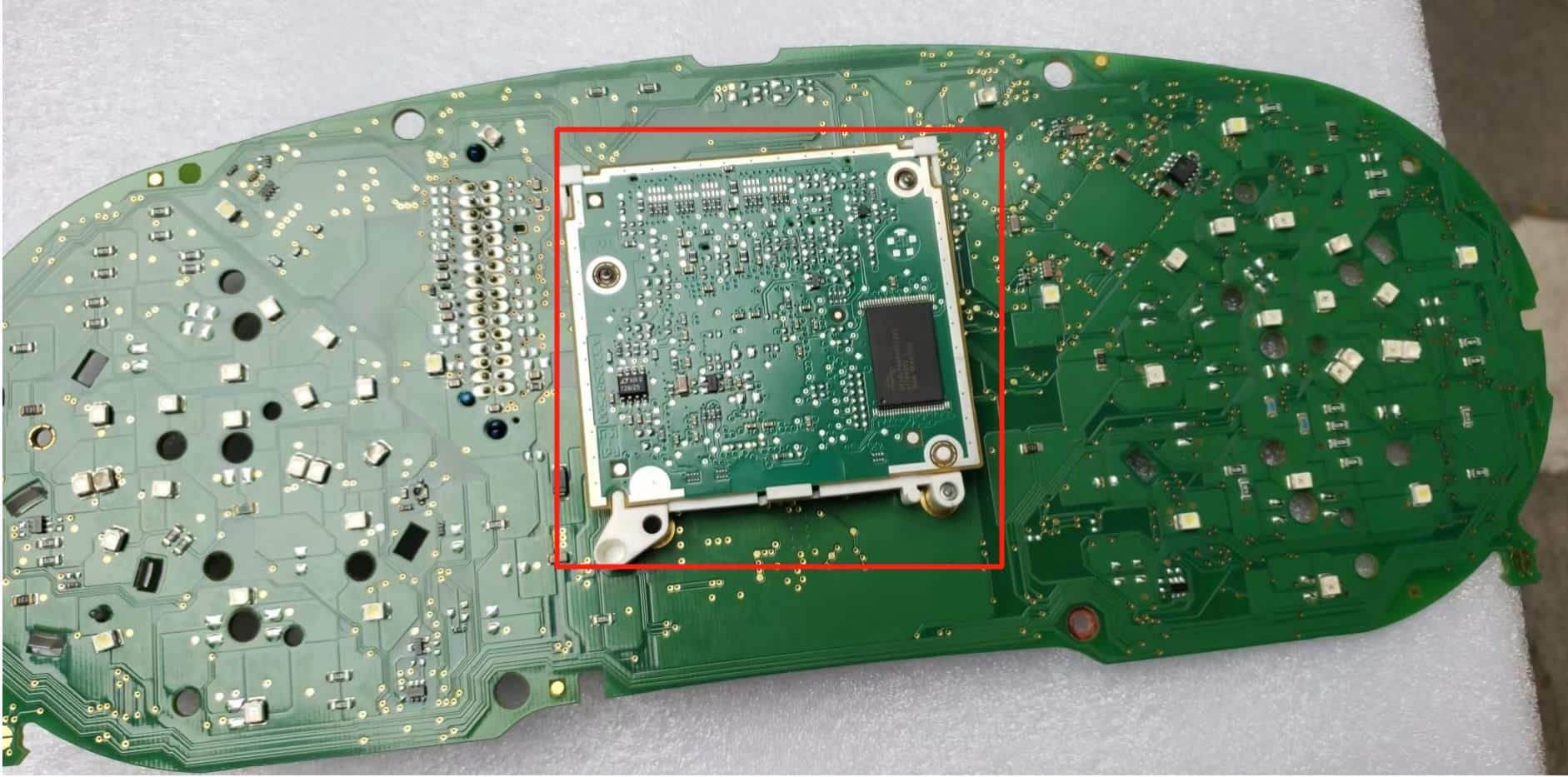
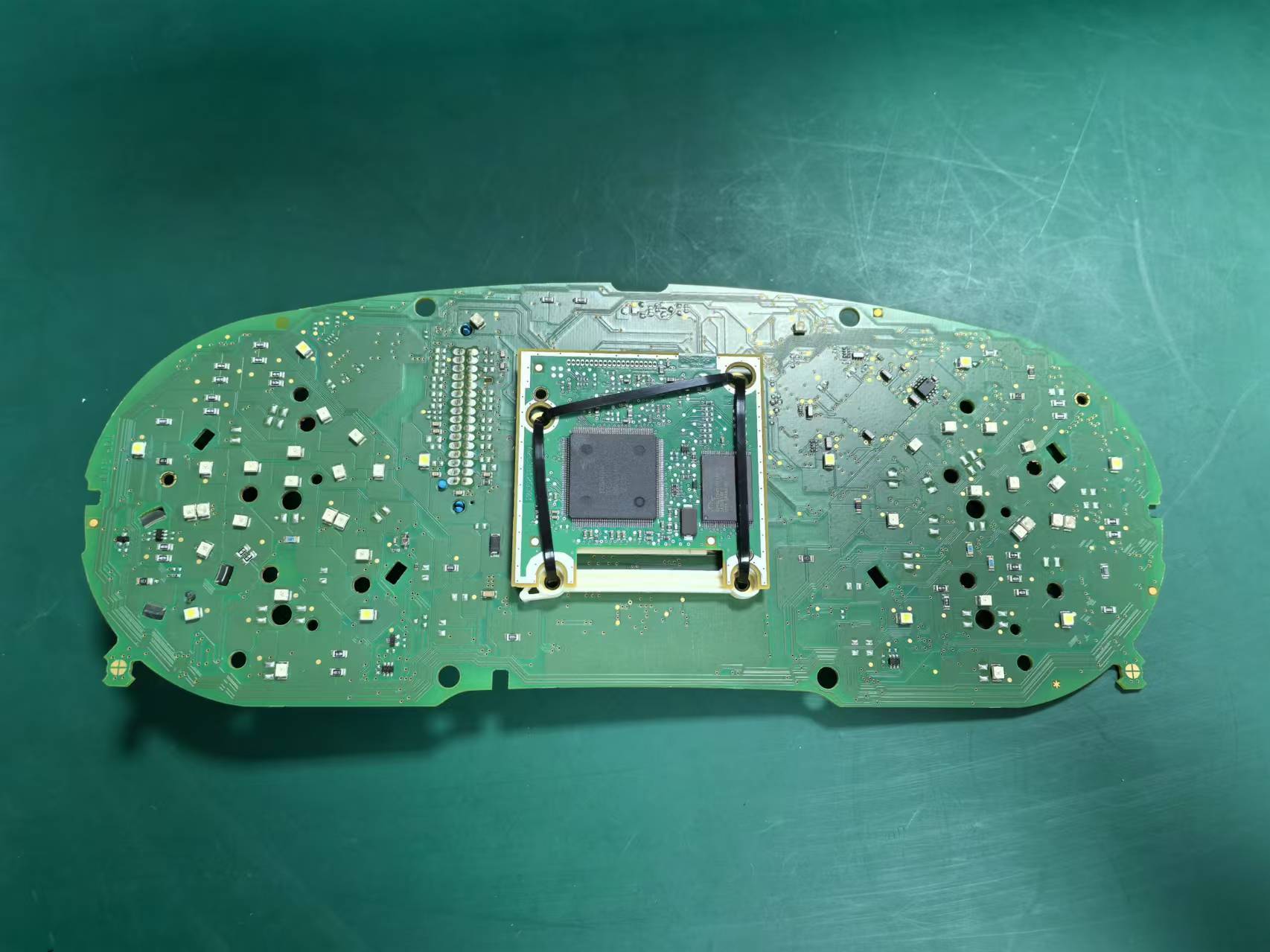
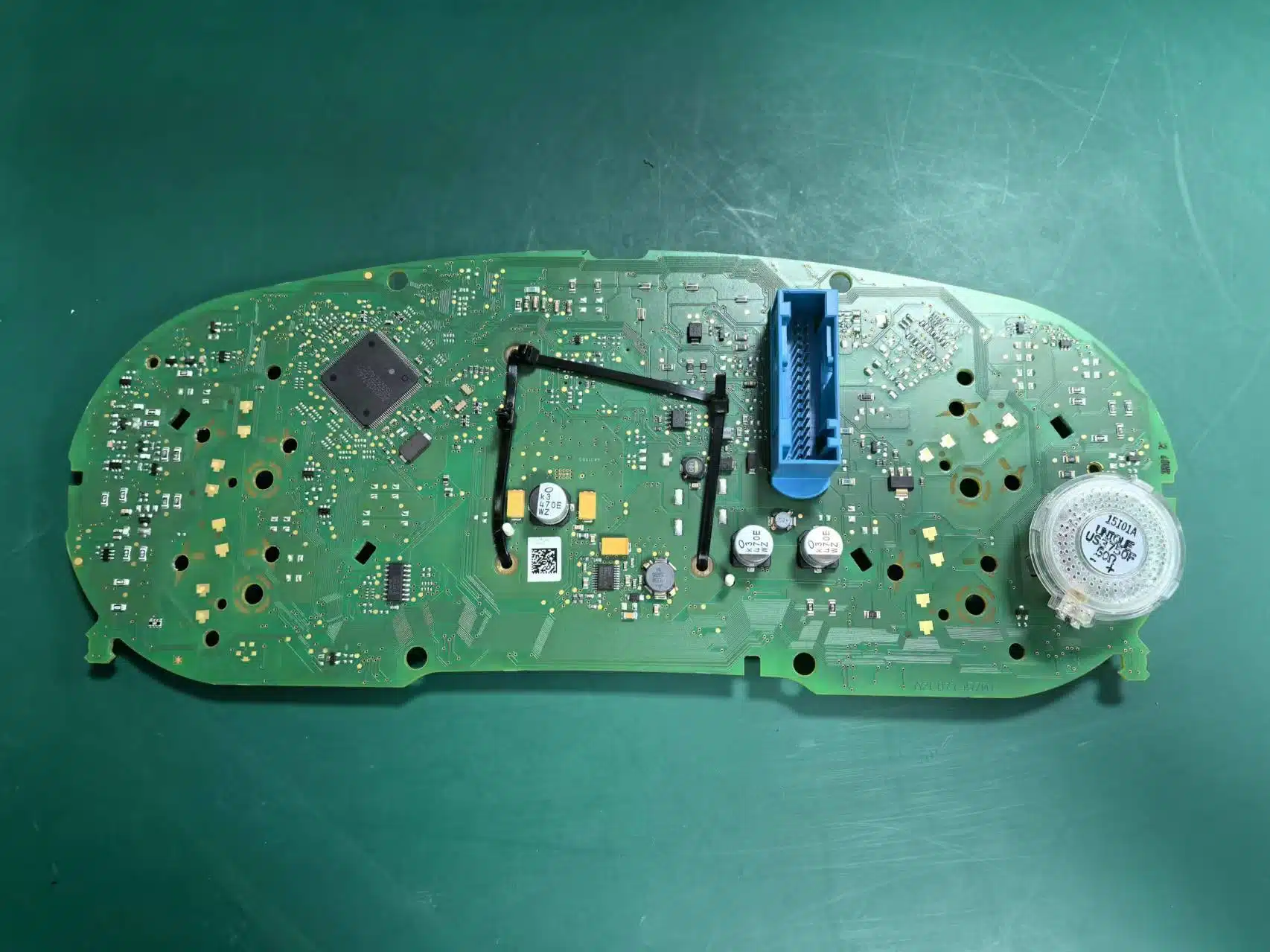
Voor deze VW/Jetta-route is het overzetten van de originele PCB/hoofdprintplaat van het instrumentencluster van het voertuig naar de nieuwe behuizing van het digitale cluster een essentiële installatiestap. De originele printplaat draagt de voertuigspecifieke identiteit en gegevensroute, dus het nieuwe digitale cluster is geen volledig zelfstandige ombouw: het originele cluster moet worden verwijderd en geopend, en de originele PCB/hoofdprintplaat (en eventuele vereiste originele onderdelen) moeten worden overgezet.
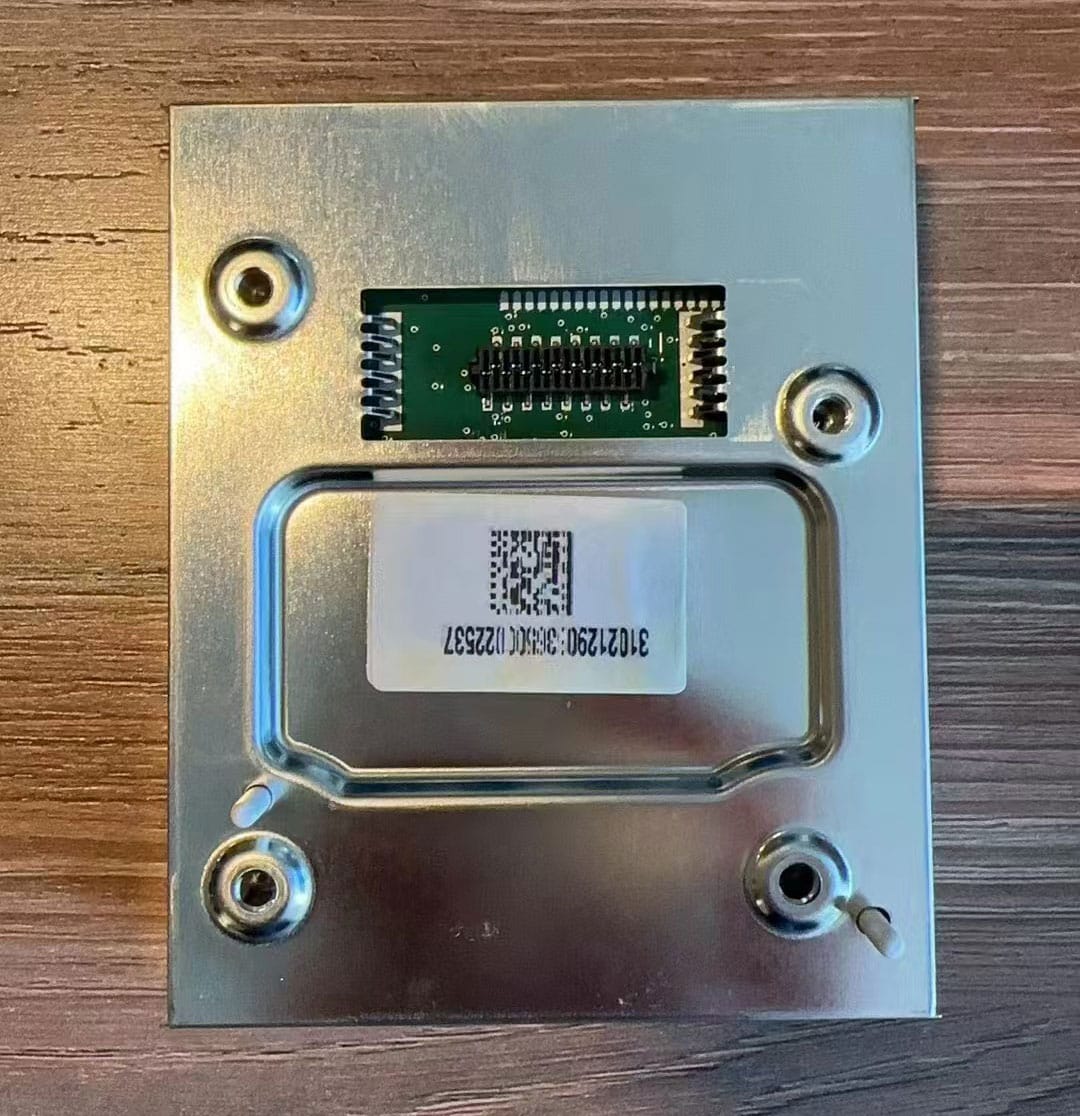
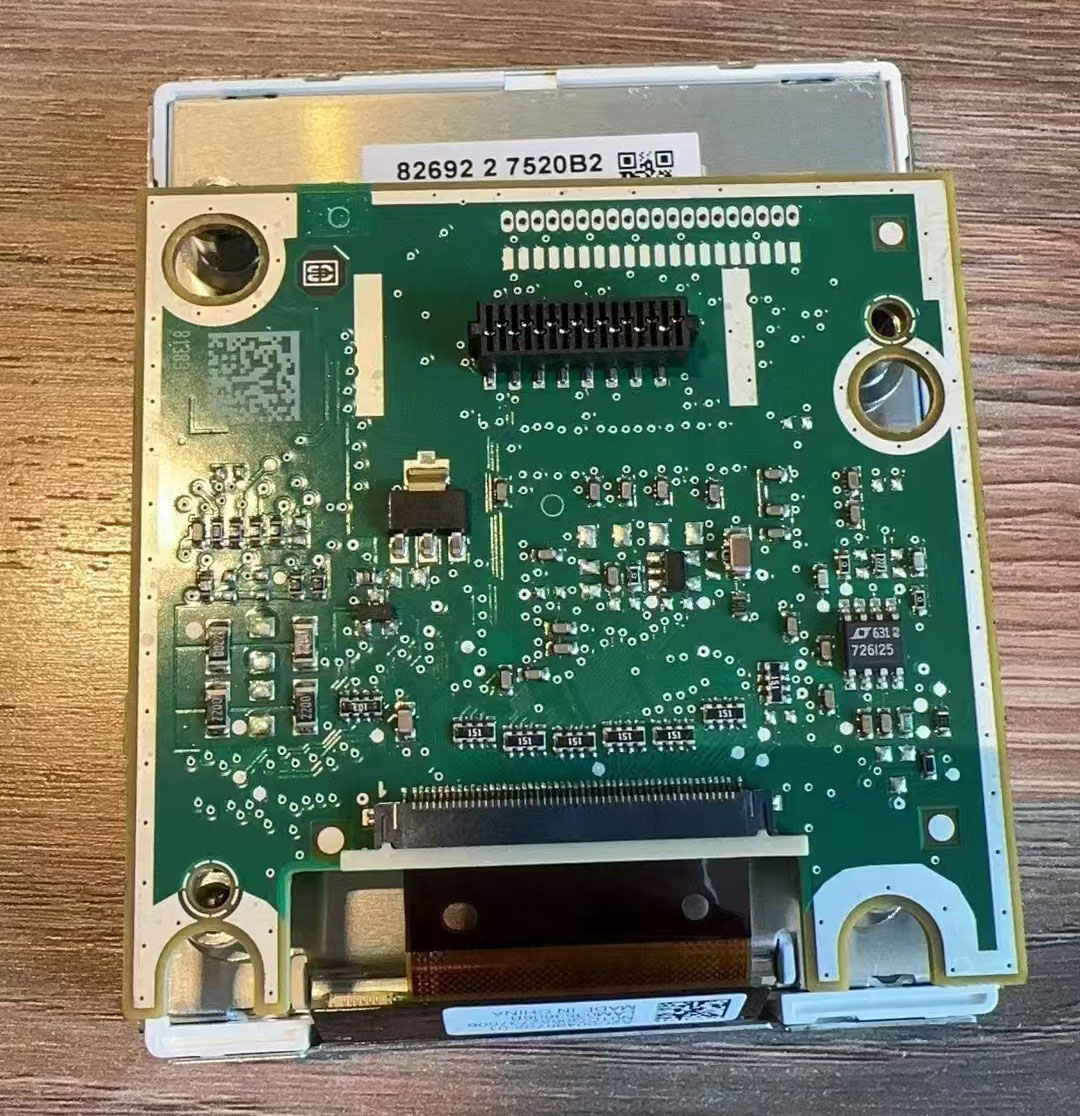
Sommige originele Jetta-clusters bevatten ook een kleine extra hulpprintplaat achter het originele display. Wanneer uw originele cluster deze printplaat heeft, moet deze ook worden behouden en correct worden overgezet in het nieuwe LCD-cluster.
Als deze printplaat ontbreekt, niet correct is geïnstalleerd of is vergeten tijdens de montage, kan de brandstofpeilmeting onnauwkeurig worden en kan de meter een waarschuwing weergeven.
Hoe moeten de USB-kabels worden geleid?
De cluster bevat twee USB-kabels: één voor toegang tot de upgrade en één voor gebruik van de smartphone-spiegel. Deze kabels moeten netjes worden geleid en in het opbergvak onder de linkerkant van het stuurwiel worden geplaatst, zodat de installatie schoon en praktisch blijft.
Hoe kan een brandstofmeter die geen vol aangeeft worden gecorrigeerd?
Als de brandstoftank vol is na installatie maar de meter niet de volledige schaal bereikt, moet de inhoud van de brandstoftank worden gekalibreerd in de systeeminstellingen.
Stappen voor kalibratie van de brandstofmeter
- Vul de tank volledig.
- Rijd een klein stukje met het voertuig.
- Ga naar het menu met rijgegevens.
- Open het gedeelte met de hervulbare hoeveelheid.
- Lees de resterende hervulbare hoeveelheid die daar wordt weergegeven.
- Voer die waarde in Instellingen → Configuratiekalibratie → Brandstoftankcapaciteit.
- Wanneer de waarde correct is, moet de hervulbare hoeveelheid nul worden en moet de brandstofmeter normaal worden weergegeven.
Hoe kunnen problemen met richtingaanwijzers worden verholpen?
Op het PQ-platform mag de optie voor fysieke verlichting in de instellingen niet zomaar worden ingeschakeld. Als deze is ingeschakeld, wordt de richtingaanwijzer mogelijk niet correct weergegeven.
Hoe kan de grafische weergave van het voertuig worden gecorrigeerd?
Als de in de interface weergegeven voertuigafbeelding niet overeenkomt met de werkelijke auto, ga dan naar Instellingen → Voertuigmodelselectie, kies het juiste model, schakel vervolgens het contact uit, vergrendel het voertuig en wacht een paar minuten totdat de wijziging is toegepast.
Wat als de stuurwielbediening niet normaal werkt?
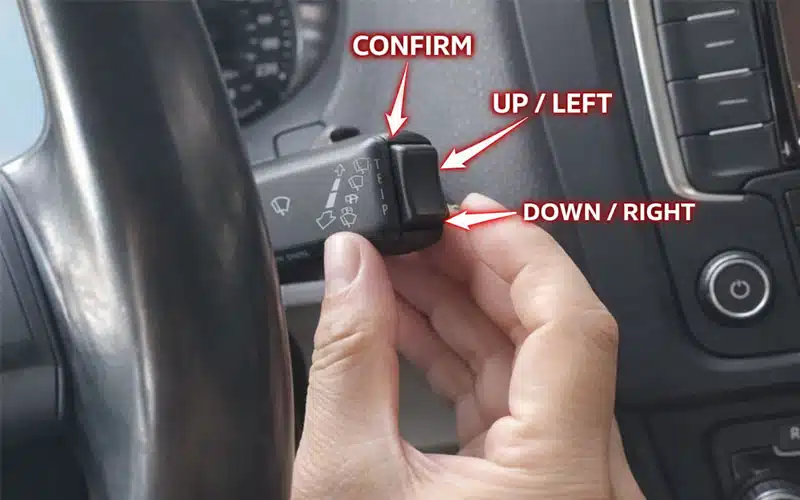
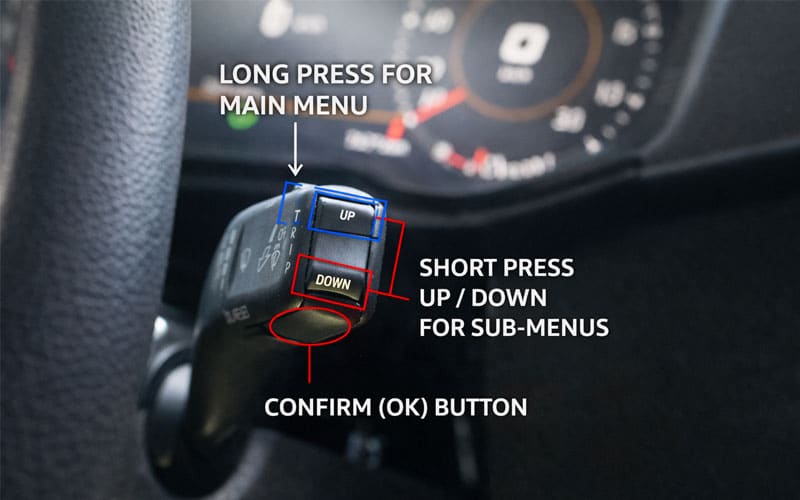
Het gedrag van de stuurwielbesturing is afhankelijk van de originele voertuiguitrusting en protocolondersteuning. Sommige voertuigen gedragen zich mogelijk niet precies zoals de referentiedemo's als de oorspronkelijke installatie verschilt.
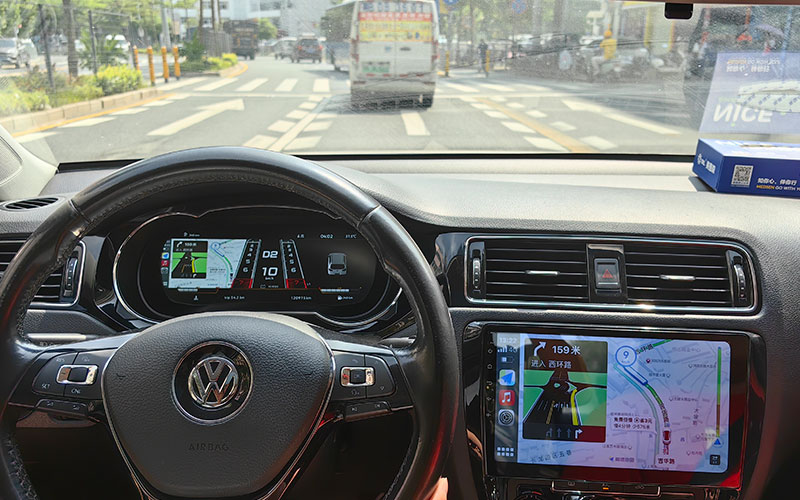
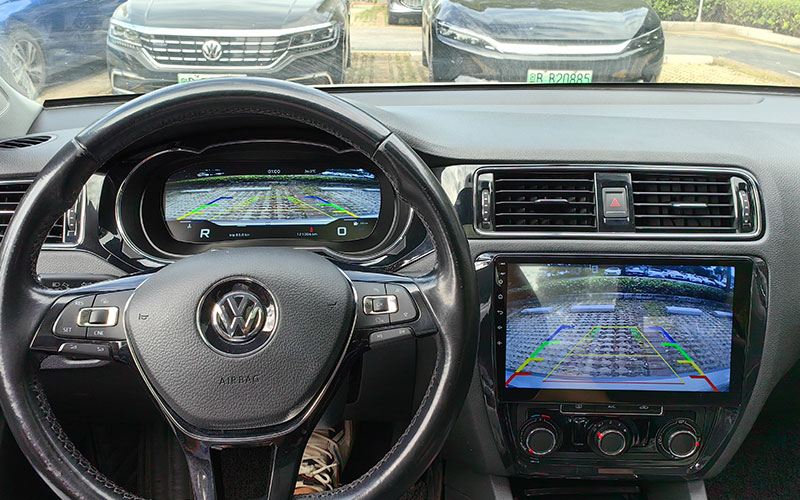
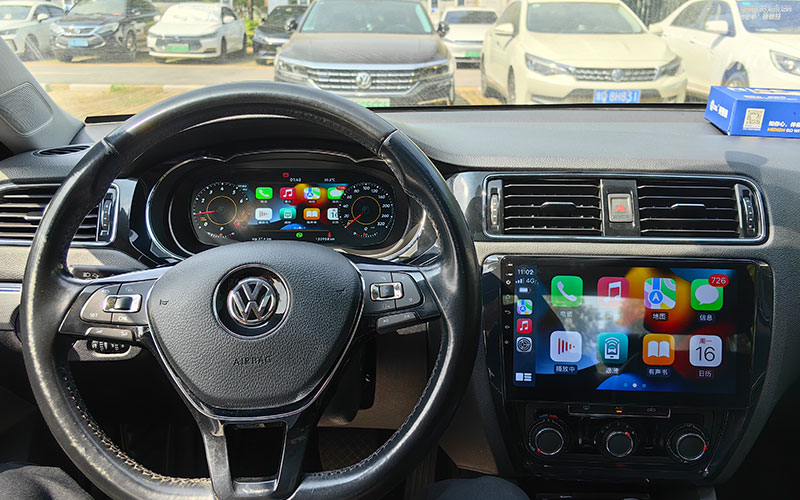
Hoe zien de uiteindelijke geïnstalleerde resultaten eruit?
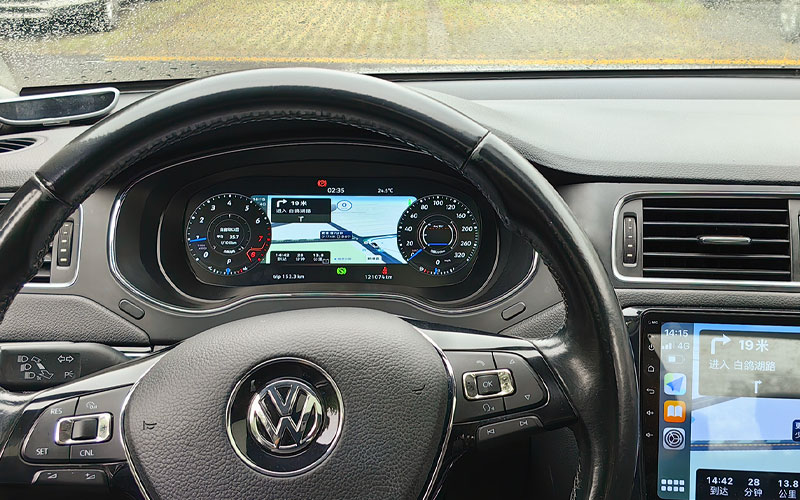
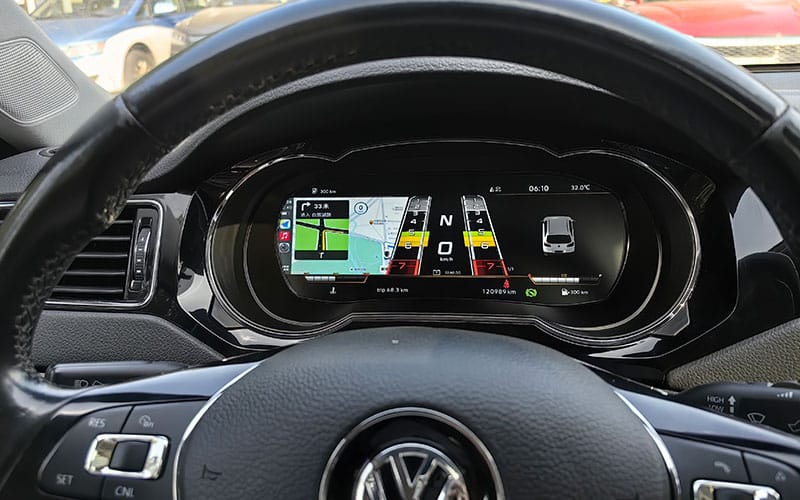
Nadat de installatie en configuratie voltooid zijn, moet het afgewerkte dashboard er netjes, geïntegreerd en consistent met de lay-out van het fabrieksinterieur uitzien. De volgende referentieafbeeldingen helpen installateurs het afgewerkte uiterlijk in het voertuig te vergelijken nadat de overdracht van de bedrading, de installatie van de printplaat, de configuratie en de kalibratie al voltooid zijn.
Eerdere versie Definitieve geïnstalleerde resultaten
De volgende afbeeldingen tonen het voltooide installatiebeeld voor de eerder ondersteunde versie nadat het digitale cluster volledig in het voertuig is gemonteerd en geconfigureerd.
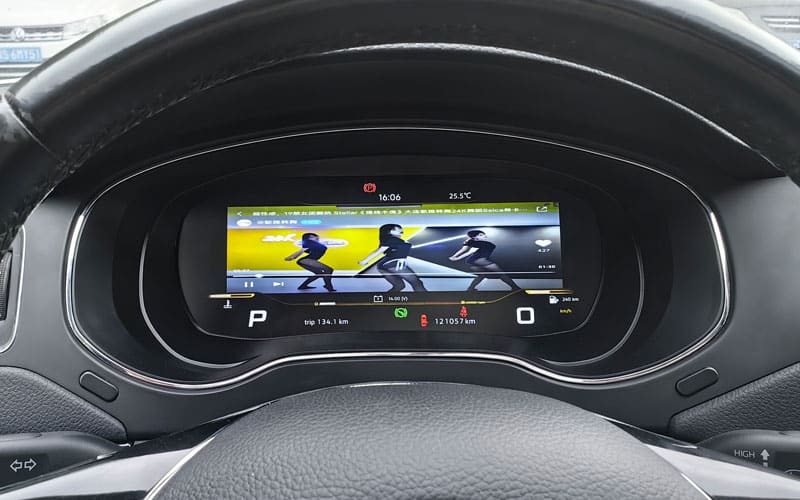
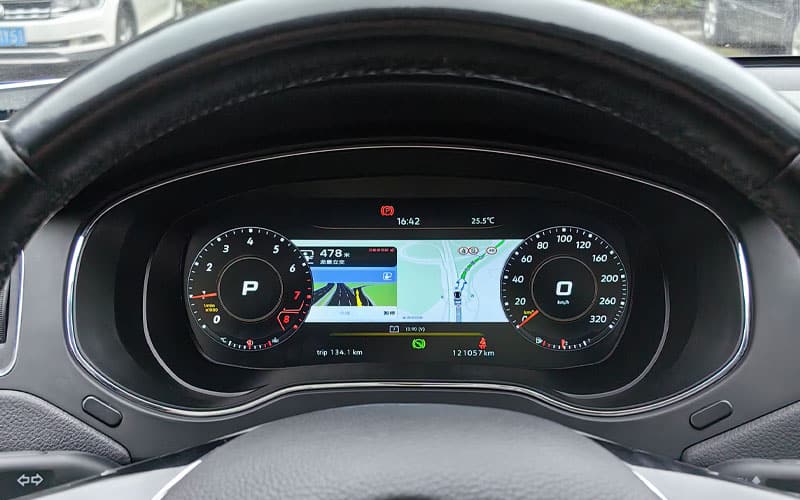
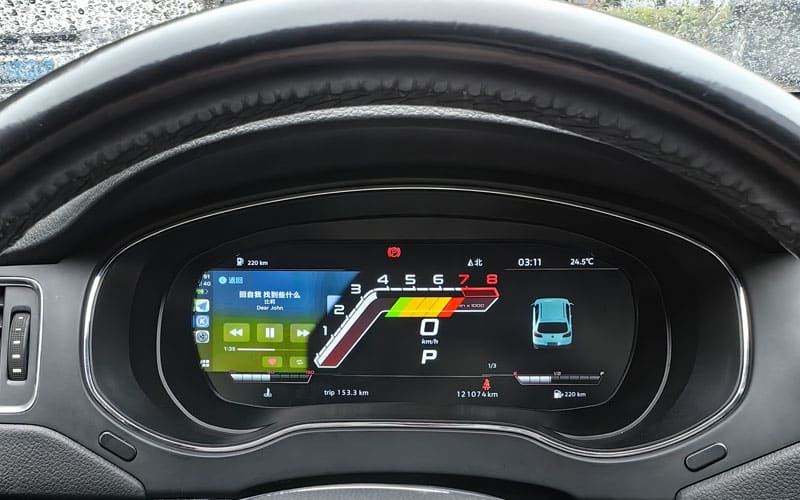
Later Ondersteunde Versie Definitieve Geïnstalleerde Resultaten
De volgende afbeeldingen tonen het voltooide installatiebeeld voor de later ondersteunde versie nadat het digitale cluster volledig in het voertuig is gemonteerd en geconfigureerd.
Veelgestelde vragen
Moet er draad worden geknipt voor dit digitale instrumentenpaneel van Volkswagen Jetta?
De bevestigde installatie is bedoeld om het doorsnijden of splicen van de fabriekskabelboom op de geverifieerde route te vermijden. Het originele cluster moet nog steeds worden verwijderd en geopend, en de originele PCB/hoofdprintplaat en vereiste componenten moeten in het nieuwe digitale cluster worden overgezet.
Moet ik de originele Jetta-instrumentencluster-PCB/hoofdprintplaat overzetten?
Ja. Voor deze VW/Jetta-route worden de originele PCB/hoofdprintplaat van het instrumentencluster (en eventuele vereiste originele onderdelen) over het algemeen overgezet naar het nieuwe digitale cluster. Bevestig de exacte printplaatindeling voor uw specifieke voertuig voordat u begint.
Heb ik codering of ECU flashen nodig?
Migratie van de originele printplaat wordt gebruikt om de originele identiteit en gegevensroute van het voertuig te behouden waar van toepassing. Instellingen, kalibratie en voertuigspecifieke aanpassing kunnen nog steeds vereist zijn, afhankelijk van het voertuig en de geleverde versie. Volg de exacte procedure die bij uw versie is geleverd in plaats van aan te nemen dat er nooit codering of flashen bij komt kijken.
Hoe weet ik welke versie ik nodig heb?
Selecteer de versie die overeenkomt met de jaargroep van uw voertuig, de originele analoge clusterindeling en de richting van het stuurwiel. Vertrouw niet alleen op de algemene modelnaam.
De VW Jetta Digital Cluster 2011–2018 productpagina somt de ondersteunde jaargroepen en het op foto's gebaseerde bevestigingsproces op.Hoe kies ik tussen links- en rechtsgestuurd?
Kies de versie die overeenkomt met de werkelijke stuurrichting van uw voertuig. Linksgestuurde en rechtsgestuurde versies mogen niet als onderling verwisselbaar worden behandeld.
Worden de originele waarschuwingslampjes en carrosserie-informatie nog steeds weergegeven?
Het product is ontworpen om belangrijk waarschuwingslichtgedrag, voertuigwaarschuwingen en weergave van carrosserie-informatie te behouden waar dit wordt ondersteund door de toepassing en de oorspronkelijke voertuigconfiguratie.
Wat veroorzaakt onnauwkeurige brandstofniveaumetingen na installatie?
In sommige gevallen is na de installatie een kalibratie van de brandstoftank nodig. Als de tank vol is maar de meter geen vol aangeeft, moet de kalibratiewaarde worden gecorrigeerd via de instellingen.
Is deze gids geschikt voor elk type Jetta cluster?
Nee. Deze handleiding is bedoeld voor ondersteunde analoge-clustertoepassingen. Voor bepaalde uitrustingen of fabrieksniveaus is mogelijk extra bevestiging nodig voor aankoop of installatie.
Wat moet ik bevestigen aan de verkoper voordat ik bestel?
Controleer de jaargroep van het voertuig, een duidelijke foto van het originele cluster en of de auto links- of rechtsgestuurd is. Dat is de veiligste manier om montagefouten te voorkomen.








Add comment